
AI video prompts are only as clear as the person writing them. If your prompt is vague, your video usually is too. As text-to-video tools become easier to use, knowing how to work well with an AI video generator is a useful skill for creators.
Strong AI video prompts lead to better scenes, fewer bad takes, and less time spent fixing things that should have been clear from the start. That matters whether you are making short clips, keeping brand visuals consistent, or moving quickly without losing the message.
The good news is that this does not need to be hard. A simple five-step method is enough to make your prompts clearer and your videos better.
AI Video Prompts Key Takeaways
Define a Clear Objective
Before writing a prompt, establish a single, clear goal to keep your scene focused and purposeful, rather than cluttered or disjointed.
Use a Reusable Structure
Implement a consistent formula—starting with your goal, defining the subject and setting, specifying style, and detailing motion—to streamline your workflow and save time.
Prioritize Specificity over Length
Avoid overwhelming the AI with unnecessary fluff; instead, focus on precise descriptors for lighting, camera movement, and mood to achieve professional-grade results.
Iterate Through Refinement
Treat prompting as an iterative process by using negative prompts to remove unwanted artifacts and testing small adjustments to perfect your final output.
Why Strong AI Video Prompts Lead to Better Results
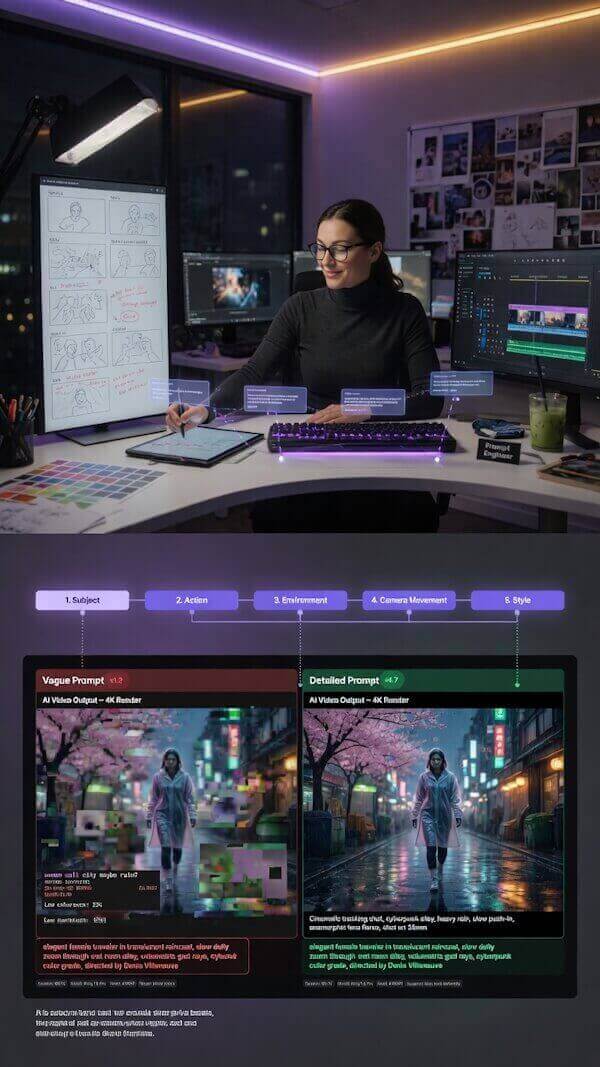
A vague prompt gives an AI video generator too much room to guess. When you fail to provide specific instructions, you end up with random backgrounds, weak motion, or clips that look nothing like your brand.
Effective AI Video Prompts do the opposite. They tell the software exactly what matters, the feeling to aim for, and the precise output you want. This reduces the need for constant revisions and ensures that your content remains consistent.
What Happens When Prompts Lack Clarity
When your instructions are too broad, the AI video generator struggles to interpret your creative vision. Common issues include:
- Confusion regarding the main subject or setting.
- A visual style that shifts unpredictably between clips.
- Lack of professional cinematography, such as incorrect camera angles or movement.
- Inconsistent pacing that fails to match your brand identity.
Whether you are using text-to-video tools for social media or marketing, these issues often lead to disjointed content that feels unprofessional.
Here’s an example. I used the vague AI video prompt “Make an exciting business video“. Because I wasn’t specific enough with my prompt, the results are rather bizarre.
Taking Control of Your AI Output
A well-crafted prompt helps you dictate the subject, setting, mood, framing, and pacing with precision. You do not need to write a lengthy narrative to achieve high-quality results.
Instead, focus on providing the essential details in a logical order to guide your AI video generator effectively. Think of it like giving clear directions to a creative partner. The model does not need a novel; it needs a specific destination to produce the professional visuals your project requires.
Step 1: Start With a Clear Goal for the Video
Before you write a single prompt word, decide what the video is supposed to do. Is it intended for explainer videos, product demos, or perhaps for generating engaging UGC-style videos to build social proof? If you skip this step, your prompt usually turns into a disorganized pile of ideas.
Choose the Main Action or Message
Boil the goal down to one sentence. For example, you might aim to show a sleek coffee brand as calm and premium, explain how a specific app saves time, or create a playful teaser for a summer product launch. One sentence is enough to provide direction.
Here’s my process. I used ChatGPT and typed the following: “A photorealistic video prompt showing the following: a sleek coffee brand as calm and premium“
The prompt ChatGPT gave me was: “Close-up cinematic shot of a sleek premium coffee package resting on a minimalist marble countertop in a modern luxury kitchen. Warm morning sunlight streams through large windows, creating soft highlights and natural reflections on the packaging. Slow camera dolly movement reveals elegant branding, clean typography, and sophisticated design details. A barista carefully pours freshly brewed coffee into a matte ceramic cup, with rich steam gently rising in slow motion. Smooth transitions show coffee beans being selected, ground, and brewed with precision. The atmosphere feels calm, refined, and intentional, emphasizing quality and trust. Neutral color palette, subtle ambient music vibe, premium lifestyle aesthetic, shallow depth of field, realistic textures, cinematic lighting, luxury commercial style, ultra-realistic human movements, 4K photorealism, high-end brand storytelling, peaceful and sophisticated mood, polished advertising quality.
I used Grok Imagine, pasted the above prompt directly into the create video option and came up with this video:
That one sentence becomes your filter. If a detail does not support your primary objective, cut it.
Match the Goal to the Audience
A prompt for a beauty brand will not sound like a prompt for a complex technical tutorial. A creator making fast social clips needs different energy and visual language than a company producing polished brand visuals.
If you are creating videos from written content, this guide on turning blog posts into short AI videos can help you shape one clear angle before you start writing your prompts. The point is simple: know who the clip is for, and make sure your prompt creates a finished result that resonates with that specific viewer.
Step 2: Add the Details AI Needs to Build the Right Scene
This is where most prompt quality comes from. The AI needs enough detail to build a scene with purpose, rather than a scene that feels random. By providing a clear roadmap, you ensure your AI video generator understands exactly what you want to create.
Describe The Subject And Setting Clearly
Name the main subject first, then describe the environment and the action. Keep it concrete to achieve the best results.
Instead of asking for a nice product video, try specifying a matte black water bottle on a stone counter, morning light, slow rotation, and tiny water droplets on the surface. Adding specific details, such as cinematic lighting or a macro close-up, helps the model construct a high-quality scene.
Use Words That Guide Style And Mood
Your chosen visual style shapes the overall look, while mood words define the emotional impact. Both are essential for high-end results.
Incorporate descriptive terms such as clean, cinematic, playful, modern, minimal, bold, soft, luxurious, gritty, or bright to steer the output. You can also elevate your cinematography by mentioning specific lighting conditions, such as the warm glow of golden hour.
Mood cues like calm, energetic, curious, hopeful, or tense help the AI interpret the scene’s personality.
Call Out Motion, Timing, And Visual Rhythm
AI video is not a still image, so motion needs explicit instructions. When defining camera movements, be specific about the shot’s physics.
Say whether you want slow movement, quick cuts, smooth transitions, steady pacing, or a looping motion. If you want a specific technical effect, ask for a slow dolly-in or a smooth tracking shot to guide the viewer’s eye.
Establishing a clear visual rhythm, such as a short, dramatic beat or a fast, social-style pace, ensures that the output matches your expectations.
Create a 12-second vertical AI video of a skincare bottle on a wet stone, with golden-hour cinematic lighting, a macro close-up, clean, luxury style, dolly-in camera movement, calm mood, and smooth, looping motion.
That prompt is concise but provides the model with a solid roadmap for professional-grade results.
Step 3: Use A Simple Prompt Structure That Works Every Time
Starting from a blank page gets old fast. A reusable structure makes writing AI video prompts quicker and more consistent, whether you are experimenting with text-to-video tools or refining your creative workflow.
Follow A Basic Formula for AI Video Prompts That You Can Reuse
A simple formula helps any AI video generator better understand your vision. Try this sequence:
- Start with the goal, such as a product demo or a cinematic storytelling clip.
- Name the subject and setting, and include a reference image if you want the model to mimic specific details.
- Add the visual style, such as cinematic lighting or a specific art direction.
- Define the motion and pacing.
- Finish with format details, such as the aspect ratio or a 9:16 vertical format.
For advanced users, you can even organize these requirements into a JSON format to ensure the AI video generator follows a strict set of parameters. If you prefer plain English, a structure like this works well: “Create a 9:16 vertical format clip showing a product demo in a modern office, featuring cinematic lighting and slow-motion camera movement.”
According to Grok: “Modern AI video models (Kling, Runway Gen-3/4, Luma, Pika, Sora, Veo, etc.) respond much better to structured, technical, cinematic language than vague or overly creative prose.”
Keep One Prompt Focused On One Result
Don’t ask the model to tell a complex brand story, describe a scene, and switch styles in one short prompt. That is how you get poor results.
One prompt should aim for one outcome. Use an anchor prompt to establish your core visual style, then use image-to-video tools to build on that initial scene. If you need three different outcomes, write three separate prompts.
Save Your Best AI Video Prompts As Templates
When a prompt works, save it. Then swap out the subject, the reference image, or the platform details next time you need a new asset.
This habit saves time and helps you keep a consistent visual voice across your brand. If you are building a larger content system, this piece on blog to video SEO strategy shows how repeatable video formats help your content travel farther.
Step 4: Review And Refine You AI Video Prompts Before You Generate
The first draft of a prompt is often functional, but the second draft is almost always superior. Taking a moment to polish your instructions can be the difference between a generic clip and a professional production.
Look For Gaps, Conflicts, And Extra Fluff
Read your prompt carefully and ask a few blunt questions. Is anything vague? Are there mixed signals? Did you ask for minimal and highly detailed elements in the same line? Did you pile on adjectives that do not actually serve the composition?
Shorter is often stronger when the words are precise. Cut the filler and keep the direction clear. If you find your scene lacks atmosphere, consider adding specifics like golden hour lighting or defining the exact cinematography style you want to achieve.
Use Negative Prompting To Purge Unwanted Elements
To get the best output, you must tell the AI what not to include. This is where negative prompting becomes essential. By explicitly listing unwanted attributes such as blurry textures, distorted limbs, or low-resolution artifacts, you significantly improve the final quality.
Keep in mind that specific requirements often differ across platforms. For example, Sora’s prompting logic might handle motion differently than Kling’s or Google Veo’s, so check your platform documentation to see how it processes negative constraints.
Test, Compare, And Improve Your Prompt
Small changes can make a massive difference in your output. Change one part of your prompt at a time so you can clearly see what helped.
Maybe your initial camera movements were too chaotic, or the subject was poorly framed. If you are struggling to describe a visual style, uploading a reference image is often the fastest way to bridge the gap between your vision and the generated result.
A lot of creators have found the same pattern in this Reddit prompting guide: lock down the what first, then improve the how. That is solid advice. Get the scene right, then fine-tune the polish to get the exact video you envisioned.
Step 5: AI Video Prompt Mistakes To Avoid
Most poor outputs from an AI video generator stem from a handful of repeated mistakes. Once you identify these pitfalls, they become much easier to fix. Here are the most common errors you should watch out for:
- Overloading Your Prompt: Trying to pack too many ideas into a single request confuses the model. If your generated clip feels messy or inconsistent, your prompt is likely too complex. Simplify your instructions to ensure the tool can focus on one cohesive visual style.
- Neglecting Style and Context: The AI needs more than a description of the subject. It needs to know how the scene should feel. Without specifying elements like cinematic lighting, tactile realism, or photoreal textures, the output may look generic. Always define the desired mood and target audience to get the best result.
- Ignoring Technical Specifications: Format details are often the difference between a usable clip and a waste of credits. Always include technical requirements such as the aspect ratio, which is crucial if you are aiming for a 9:16 vertical format for social media.
- Omitting Camera Instructions: If you fail to specify camera movements, the AI might default to a static shot. Enhance your results by defining motion, such as a handheld camera effect, to add energy and a professional layer to your video.
- Forgetting Duration and Loop Details: If you need a specific length, such as a 10-second clip or a seamless loop, you must state this clearly in your prompt. Providing precise duration and framing instructions helps the model align the scene with your specific project needs.
FAQ: Common Questions About AI Video Prompts
How Long Should An AI Video Prompt Be?
Long enough to be clear, short enough to stay focused. Most strong AI video prompts are one to four sentences, not a wall of text. While tools like Seedance allow for expressive descriptions, keeping your core instructions concise helps the AI video generator stay on track without getting confused by unnecessary filler.
Is More Detail Always Better?
No. Quality is better than quantity. Extra words that do not guide the scene can muddy the result. To achieve professional results, focus on specific technical commands, such as a 360-degree orbit around the subject or precise lighting conditions. If your platform supports it, using negative prompting can also help you strip away unwanted elements that might otherwise clutter your shot.
What Should I Do If The Video Looks Weak?
Tighten the subject, setting, and motion first. If the output remains subpar, experiment with image-to-video features to provide the model with a clearer visual reference. For more advanced control, consider using timestamp prompting to specify exactly when specific actions should occur, or adjust your technical parameters if you are comfortable working with JSON-formatted data to refine the output instructions.
Can One Prompt Work Across Different Platforms?
The core concept can remain the same, but technical formatting should change based on your target destination. A vertical 9:16 social media clip and a wider website video usually require different framing and pacing. Always adjust your settings to match the specific resolution and aspect ratio requirements of the platform where the content will live.
Final Thoughts About AI Video Prompts
Mastering AI video prompts makes the creative process easier by removing the guesswork from your workflow. By starting with a clear goal, adding specific scene details, and following a consistent structure, you can achieve professional cinematography and a cohesive visual style in every project.
Remember that creating high-quality content is an iterative journey. You do not need perfect results on your first attempt. Instead, focus on writing better prompts than the last one, refining your process as you go, and using these steps to turn your ideas into reality.

As a Visual Digital Marketing Specialist for New Horizons 123, Julie works to grow small businesses, increasing their online visibility by leveraging the latest in internet and video technologies. She specializes in creative camera-less animated video production, custom images, content writing, and SlideShare presentations. Julie also manages content, blog management, email marketing, marketing automation, and social media for her clients.



0 Comments