
AI character consistency keeps your brand character recognizable across every post. Nothing weakens a character faster than seeing it turn into a stranger in the next piece of content.
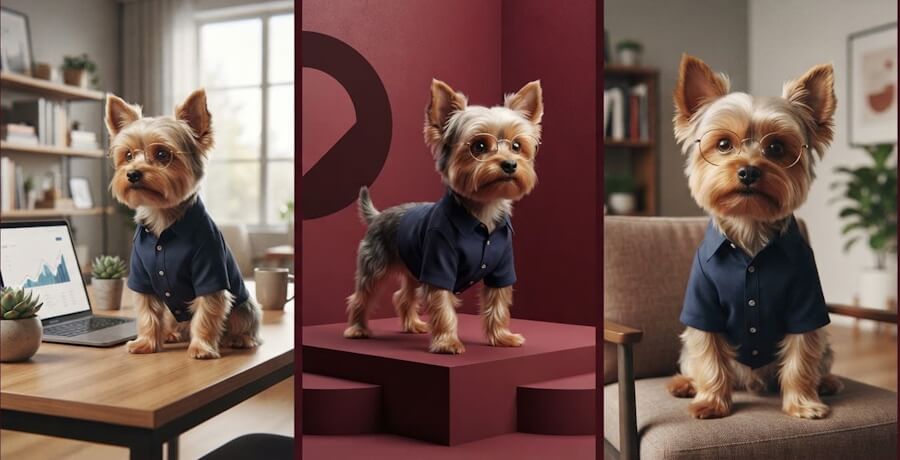
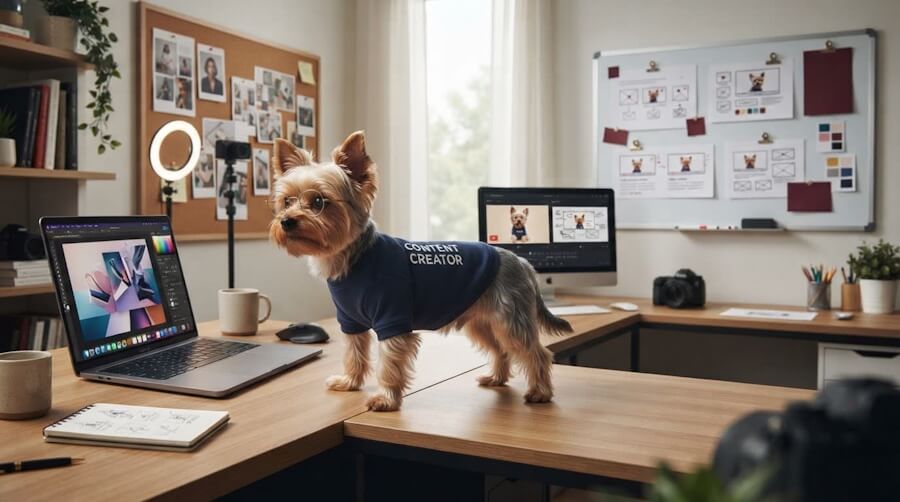
One day, your Yorkie wears round glasses and a navy content creator shirt while sitting beside a laptop. The next day, it has different fur, a new body shape, and looks like an entirely different dog. Not exactly a strong brand identity.
AI character consistency prevents that visual mess from taking over your campaign. In practice, character consistency AI is a repeatable production system. It helps you create a character that stays recognizable across images and videos, even though no tool can reproduce it perfectly every time.
This matters for social graphics, blog images, ads, thumbnails, and AI-generated videos. A master character description, approved references, reusable prompts, and human review help the same Yorkie appear consistently across every asset.
Yorkies are a fun example, but the same system works for a human spokesperson, a fantasy mascot, or a storybook character. Start with a source of truth, not a wish and a prompt.
Key Takeaways
- A reliable workflow uses approved references, reusable prompts, version control, and human review.
- Create a character bible with a clear character reference. Separate fixed traits, such as facial features, proportions, wardrobe, and accessories, from flexible campaign details.
- Build a repeatable character consistency ai workflow with prompt templates, reference-image editing, settings logs, organized folders, and clear team handoffs.
- Test characters across scenes, image sizes, layouts, and AI-generated videos using a reference image to catch identity drift before publishing.
- When a character drifts, diagnose the failure, return to the last approved version, simplify competing instructions, and update the bible after an intentional change. This makes a consistent character easier to scale and review.
Why AI Characters Drift Across Brand Campaign Assets
AI character consistency is difficult because an AI character generator doesn’t reliably remember your character from yesterday’s prompt. Even a consistent character ai generator evaluates each output independently across multiple generations.
Change the camera angle, lighting, clothing instructions, image size, reference image, or editing request, and the model may change the face, fur, proportions, or accessories. A wide banner may make a character look slimmer than a square social post. Dramatic lighting can alter apparent eye color. A “playful outfit” instruction may make the signature shirt disappear.
That’s not always bad. New expressions or seasonal settings are normal for character variations. A different breed, facial features, proportions, or accessories can change the character identity. Losing a consistent character across assets is identity drift, and it creates a multi-image consistency problem.
Picture the Yorkie example. Your approved character is a small tan-and-grey Yorkie with round glasses, a navy shirt, and a friendly, little-creator vibe. A new image gives you a fluffier brown dog in a hoodie with no glasses. Cute? Maybe. It no longer looks like a consistent character.
This is the core problem a character consistency ai workflow needs to address. The SSW workflow for consistent AI characters makes the same point: organized references, prompts, and review steps beat random one-off generations.
An attractive image is not automatically an approved brand asset. If it doesn’t match the master character, it belongs in the drafts folder.
Consistency builds recognition. Recognition builds trust. It also saves your team from spending an hour explaining why the consistent character suddenly has a new face.
Build A Character Bible That Becomes Your Brand’s Source Of Truth
For character consistency AI workflows, your character bible is the document everyone uses before creating an image or AI video. Keep it in a shared, versioned brand-assets folder. No mystery files. No “I think this was the one we used last time.” Used well, it protects a consistent character across every campaign asset.
Start with a master character description that captures the character’s fixed identity:
- Species or character type, face shape, fur or hair pattern, eye color, facial features, and body proportions.
- Approved clothing, signature accessories, colors, logo rules, and personality.
- Typical expressions, poses, posture guidelines, camera views, lighting preferences, and background boundaries.
- Details that must never change without the brand owner’s approval.
For example, a Yorkie master character description might say: tan-and-grey silky fur, compact body, round glasses, navy creator shirt, friendly alert expression, and laptop-friendly workspaces.
It should also define what is off-limits: no breed changes, no missing glasses, no unapproved hats, and no oversized human-like body. Keep the style reference separate from these identity rules, so the visual treatment can evolve without changing the character.
Use simple file names so nobody grabs the wrong image at 11:47 p.m. before a launch:
YorkieCreator_Master_v01YorkieCreator_Sheet_v01YorkieCreator_SocialSquare_v03YorkieCreator_VideoReference_Approved_v02
A detailed character bible also makes AI image prompts for brands easier to reuse and improve. It also gives you the detail needed to write a clear AI image prompt instead of hoping a vague description produces the same character every time.
Choose And Approve Reference Images Before You Generate More
Pick one clean, clear reference image first. It should show the character’s defining features without extreme filters, chaotic props, or lighting that hides half the face. Save it as the master reference file for future work.
Then create a small approved character reference with front, side, and three-quarter views. Include a few expressions and poses. You don’t need 50 almost-identical images. You need a small set that answers the real questions: What does this character look like when smiling, seated, standing, or turned sideways?
A front, side, and three-quarter character reference supports multi-image consistency across social graphics, ads, and video. Use the strongest reference image for still-image creation and AI-generated video work. This gives you a consistent character across different formats and character variations.
Get the brand owner to approve those references before the campaign starts. Also verify commercial use rights for source assets, generated outputs, logos, and any training data before publication. Fixing one base image is cheap. Fixing 40 published assets is not.
Separate Fixed Traits From Flexible Campaign Details
This is where many prompts go off the rails. Teams either lock down every tiny detail, which makes images stiff, or leave everything loose, which creates visual chaos.
Label the fixed traits as the character identity. Keep breed, face, fur pattern, proportions, eye color, signature wardrobe, logo placement, and core accessories fixed. Let the setting, pose, crop, supporting props, mood, and seasonal accents vary.
Your Yorkie can sit beside a computer in one post and peek from behind a stack of books in another. Keep the glasses, coat pattern, shirt, and compact frame consistent. The goal is a consistent character, whether you’re creating content for a human founder or a purple space mascot. The scene can change. The character shouldn’t. A consistent character should remain recognizable even when the campaign design changes.
Create A Repeatable AI Character Consistency Workflow
Here is the sequence: load the approved character reference, reuse the identity block and text prompt template, create a small batch, compare multiple generations, edit the strongest result, log the settings, approve the asset, and save its version.
Don’t write a new prompt from scratch every time. That’s how campaigns become the visual version of a group project where nobody read the assignment.
Start every prompt with the character identity. The model doesn’t know that “our mascot” means the same character from last week’s ad.
This character-consistency AI workflow turns prompt engineering into controlled repetition. Change one variable at a time, and keep references, instructions, and review criteria stable. A consistent character depends on that structure.
Grok Imagine is useful here because it supports image generation and reference-image editing. Check its current product documentation before relying on specific controls. RightBlogger also supports custom campaign images from detailed descriptions. Its AI Image Generator turns a clear idea into a visual, while RightBlogger Chat lets you generate images within the chat workflow. Its image generation update confirms that capability.
OpenArt, Kling AI, and Ideogram Character are other tools worth evaluating. Kling AI may offer different controls from Kling AI updates, so verify current features. Compare reference-image limits, editing controls, seeds, model availability, commercial-use terms, and output rights. Don’t assume a consistent character AI generator or any AI character generator works automatically. OpenArt features can also change, so review current documentation before building a workflow around them.
Other platforms exist. They aren’t part of this brand’s regular process, so don’t tool-hop just because a new button looks shiny. If you are still comparing platforms, this guide to AI image generator options can help you understand the basics before choosing a tool for your character workflow.
Use Prompt Templates That Protect Identity And Brand Style
Put the character identity first. Then add the scene. That order matters.
A good template includes fixed appearance, wardrobe and accessories, expression or action, setting, composition, lighting, art direction, aspect ratio, and exclusions. Keep the identity section unchanged. Update the campaign section for each asset. Include negative prompts such as no breed change, missing glasses, altered proportions, or different clothing colors.
For example: “Use the approved Yorkie creator character. Preserve the compact tan-and-gray Yorkie, round glasses, navy content creator shirt, silky fur texture, and friendly alert expression. The dog sits near one laptop in a bright welcoming office. Three-quarter view, clean editorial brand style, horizontal composition. Do not change breed, coat pattern, glasses, body proportions, or shirt color.”
The same prompt structure matters when your character moves or speaks. Use these AI video prompts to plan camera direction, motion, scenes, and consistent character details before generating video.
That structure works for people, animals, robots, and fictional characters. A consistent character improves when the prompt is repeatable, not when it reads like a frantic paragraph written during a coffee emergency.
Use a master character description for fixed traits, then add a style reference or campaign details separately. Include the text prompt in your saved template, and keep scene changes easy to review.
Manage Settings, Edits, And Versions Where Supported
A seed can help create similar results in tools that expose seed controls. It doesn’t guarantee an identical character. Treat it as a useful record, not magic fairy dust.
Log the tool, model, prompt version, reference files, seed when available, aspect ratio, style settings, date, and editor. If you get a nearly perfect result, use an image-editing or image-to-image workflow instead of starting over with a text prompt. Preserve the approved reference image when changing the background or composition, and export a high-resolution version when the asset is finalized..
Grok Imagine’s reference-image editing options may help preserve a strong approved result while changing the background or composition. For RightBlogger, save the approved reference, prompt, and final image outside the platform. Public product information doesn’t confirm seed locking or full version history.
OpenArt and other platforms may support multi-image consistency or character variations, but verify those features in current documentation. Keep the consistent character under human review, even when a tool offers advanced controls.
LoRA training or a custom model can support stronger identity preservation. It’s an optional advanced path requiring technical setup, rights review, and validation. It isn’t a universal solution. Use four folders: drafts, selected assets, approved assets, and retired versions. Boring? Yes. Useful? Also yes.
Make Team Handoffs Simple And Safe
Every designer, writer, marketer, or AI video creator needs the current character bible, master reference image, approved prompt template, style guide, campaign brief, file naming rules, and review checklist.
Nobody should replace the master reference or change fixed traits without approval. Freelancers and agencies need the same guardrails, plus a named sign-off owner.
Ask every creator to return the prompt and settings with each selected asset. That way, another person can revise the work without guessing what happened. This is especially helpful when you use AI visual services for brands across multiple campaign channels.
A consistent character requires the same handoff discipline across images, animations, and video assets. This is where character consistency ai becomes a team process instead of an individual trick.
Test AI Characters Across Scenes, Sizes, And AI-Generated Videos
AI character consistency depends on testing before a campaign scales. A consistent character can look perfect in one square graphic and fail in a vertical story, horizontal banner, or AI-generated video.
A practical character consistency AI workflow checks identity before polish. Even a consistent character can have the wrong face, fur, clothing, or proportions in a high-quality asset.
Build a test matrix around the same reference image: one close-up, one full-body image, a side angle, a three-quarter angle, a simple background, a busy background, a square post, a vertical post, and a wide layout. Each asset should feature a consistent character. Compare every result with the master and style reference.
Use the same text prompt across multiple generations when possible. Then review character variations for stable facial features, proportions, clothing, and signature details. This reveals multi-image consistency problems before they spread across a campaign.
For AI videos and animation, inspect motion as well as individual frames. Watch for changing facial features, shifting fur or hair, disappearing clothing details, warped paws or hands, and frame-to-frame identity changes. A consistent character should stay consistent across shots, scenes, and exported frames.
If the character talks, check lip movement, captions, and audio for accuracy. A technically clean sequence can still look artificial when the character identity changes. A recurring dog mascot can work especially well in short-form content when its visual traits stay stable. These AI dog videos show why a recognizable animal character can help content feel more familiar from one post to the next.
Check Tool Capabilities, Rights, and Likeness Controls
Before choosing an AI character generator, check current image and video capabilities in Imagine overview, Kling AI, and Ideogram Character. Review current Kling AI documentation and each tool’s terms for reference images, likeness controls, and commercial use. A face swap can introduce identity, consent, and likeness risks, so it shouldn’t replace a controlled character reference workflow.
Character consistency is only one part of approval. Use an AI brand safety review to check likeness permissions, claims, disclosure, and final campaign context.
Treat character consistency AI as a quality-control process, not a final visual check. Visual review is only one part of that process. You should also fact-check AI content before it goes live, especially when an image, caption, script, or voiceover makes a specific claim.
Tools change, but your review standards should stay put.
| Review Area | What To Check |
|---|---|
| Character identity | Face shape, fur or hair, proportions, eye color, and signature features match the character reference. |
| Brand details | Clothing, accessories, approved colors, logo use, and usage permissions are correct. |
| Multi-image consistency | The same character identity remains recognizable across multiple generations, scenes, and layouts. |
| Campaign fit | Expression, pose, scene, lighting, and crop support the message. |
| Technical quality | The image is high resolution, text is readable, the crop is safe, and no artificial effect distracts from the message. |
| Accessibility | Use accurate alt text for marketing graphics, and make sure captions and audio details match the final asset. |
| AI video quality | Video consistency holds across shots and frames, motion stays stable, and the final export is clean. |
Fix The Most Common Character Consistency Failures
When a character changes too much, don’t keep requesting multiple generations and hoping one behaves. A character consistency AI workflow starts with diagnosis. Stop and identify the failure first.
Character drift is one of several AI image fails that can make a brand asset look unpolished. Before approving an image, check the character’s face, proportions, and background details.
If the text prompt changed too much, return to the approved template and simplify the scene instructions. Use prompt engineering to change one variable at a time. If a source conflicts with the approved design, remove the weaker one and keep the most useful character reference. Restore fixed-trait exclusions with negative prompts when needed.
If the style request is taking over, reduce competing directions such as “hyper-real, cartoon, dramatic, glossy, vintage.” Pick one direction. Character consistency works better when identity and style instructions don’t compete.
Check the failure itself. Facial features that drift need a return to the approved face. A missing pair of Yorkie glasses is a fixed-trait failure. A different coat pattern is more serious. Inconsistent proportions, lost clothing, and unwanted color changes also require correction.
To restore a consistent character, roll back to the last approved version and use an edit workflow instead of restarting. An edit can preserve the high-resolution source while fixing one detail. Document every correction so the team knows which text prompt and approved asset to use next.
Handle Likeness Changes and Advanced Workflows
The same applies to a human spokesperson whose face suddenly looks 15 years younger, or a fictional mascot whose signature jacket vanishes. A face swap may alter likeness or introduce visible artifacts. Treat a second face swap as a controlled edit, with consent, rights review, commercial use checks, and the same approval process as any other change.
Kling AI may help teams test recurring designs, while Ideogram Character is another option to evaluate independently. Neither tool guarantees video consistency across every scene. For a second opinion on recurring designs, the Kling AI workflow ideas in Kling’s character consistency guide offer useful reference and parameter-management ideas.
For high-volume teams, LoRA training or a custom model can be an escalation path. Both require suitable training data, technical expertise, rights clearance, and quality testing. Neither approach solves every scene or video problem. Don’t quietly let accidental drift become the new normal. If a change is intentional, preserve a consistent character by updating the character bible, issuing a new master reference, and labeling the new version.
Final Thoughts About AI Character Consistency
Reliable AI character consistency comes from a system, not hoping the model remembers your last great image.
A character consistency AI system improves recognisable results, but it can’t eliminate model variation or replace human oversight. To keep a consistent character, use this seven-day checklist:
- Approve one master asset.
- Document the character’s fixed traits.
- Reuse one prompt template.
- Record model and seed settings where available.
- Test square, vertical, wide, and AI-video outputs.
- Obtain human approval before anything goes live.
For campaigns that need moving visuals as well as static images, explore these AI visual marketing tools before building a larger production process.
With this process, your Yorkie can remain a consistent character, and so can every mascot or campaign persona that follows.
Frequently Asked Questions About AI Character Consistency
What does character consistency mean?
It means keeping a character recognizable across images, layouts, scenes, and videos. This requires clear identity rules, approved assets, reusable prompts, and human quality control.
How do you keep a character consistent?
Build a character bible with approved front, side, and three-quarter views. Use one reference image, reuse the same identity prompt, preserve fixed traits, log generation settings, and compare each asset with the master version. A consistent character depends on this repeatable review process.
Why do AI-generated characters change between images?
AI tools respond to the current prompt, composition, lighting, reference, and model behavior. Changes in these inputs can alter facial features, fur or hair, proportions, clothing, and accessories.
Can AI-generated videos maintain character identity?
They can, but video requires additional checks for facial features, clothing, proportions, and motion. Test a consistent character in short sequences, and review exported frames one by one before a larger campaign.
What should you do when an AI character drifts?
First, identify whether the issue came from the prompt, reference, style instructions, or editing workflow. Return to the last approved version, simplify the instructions, restore fixed-trait exclusions, and edit the existing asset when possible instead of starting over.
Create Better AI Character Prompts With RightBlogger
Character consistency starts before you generate the first image or video. RightBlogger can help you build a clearer plan, write stronger prompts, and create supporting brand content. Use RightBlogger to:
- Create detailed character profiles and visual reference notes
- Improve prompts before sending them to an image or video generator
- Build scene ideas that keep a character’s look, voice, and personality consistent
- Turn your character process into blog posts, video scripts, social captions, and client resources
- Generate custom visuals to support your content strategy
Ready to make your AI characters easier to manage? Try the RightBlogger AI Image Generator and use RightBlogger’s writing tools to organize the prompts and content behind every campaign.

As a Visual Digital Marketing Specialist for New Horizons 123, Julie works to grow small businesses, increasing their online visibility by leveraging the latest in internet and video technologies. She specializes in creative camera-less animated video production, custom images, content writing, and SlideShare presentations. Julie also manages content, blog management, email marketing, marketing automation, and social media for her clients.



0 Comments