
An AI image prompt can quickly expose weak social graphics. The colors drift, the mood changes, and the layout looks like five different brands got involved. A vague prompt often creates these messy results.
That usually isn’t the image generator’s fault. It’s the prompt structure. With generative AI, an AI image prompt should read like a clear creative brief, not a random wish list. This article shows you how to build prompts that create dependable, usable social graphics.
Key Takeaways: AI Image Prompt
- A strong AI image prompt works like a creative brief, defining the graphic’s purpose, audience, platform, visual style, and exclusions.
- Brand-ready social graphics need consistent colors, lighting, composition, mood, and negative space for copy, logos, and calls to action.
- Use a clear prompt order: subject, composition, brand look, color and light, output format, then what to avoid.
- Specific prompts outperform vague descriptions, especially when limiting adjective overload, fake text, clutter, generic stock imagery, and unwanted objects.
- Turn successful prompts into reusable templates and prompt libraries so your team can create consistent visuals across social platforms, campaigns, and AI video projects.
What Brand-Ready Actually Means
A brand-ready graphic isn’t only “good-looking.” It looks like it belongs to your business the second someone sees it.
That means the visual style stays consistent. The palette feels familiar. Additionally, the lighting, mood, composition, and subject treatment all fit the brand. Even the empty space matters, because social graphics often need room for a headline, logo, or callout later. For example, a portrait prompt might call for a cinematic portrait with the same lighting and framing used across your brand.
This is where many prompts fall apart. People ask for “a modern social media graphic” or “a stylish marketing image.” That sounds fine, but it tells the image model almost nothing useful. “Modern” can mean glossy tech, soft minimalism, bold editorial, or neon futurism. It can even suggest a completely different artistic style. A photorealistic image is only one possible brand direction, not a replacement for consistent visual rules.
A brand-ready AI image prompt is tighter. It tells the model what the image is for, who it should speak to, and how the brand should show up. It also says what to avoid. That’s not restrictive. That’s direction.
Think about the graphic’s job. Is it meant to stop the scroll? Support a quote post? Frame a product message? Work as a clean background for text? A clear AI image prompt gives the visual one purpose, helping its visual storytelling connect with the audience. A good social image does one job well. It doesn’t try to be everything at once.
If your visuals still feel scattered, it’s worth establishing a consistent brand visual style before you write another prompt. An image-to-prompt workflow can help you reverse engineer the composition, palette, and mood of a successful branded post. That means studying the visual ingredients, not copying another brand. Clear visual rules speed up prompt writing, and outputs improve quickly.
One AI image prompt that creates a reusable brand asset beats one that creates a random pretty picture.
Build The AI Image Prompt Like A Creative Brief
The easiest way to write a stronger AI image prompt is to stop thinking like a prompt writer. Start thinking like a creative director.
Ask the same questions you’d ask before hiring a designer. Who is this for? Where will it appear? What should the viewer feel? Also, what brand cues must stay in place? What should never show up? You can also reverse-engineer the brief from the audience response, layout, and brand impression you want.
Start with this repeatable prompt structure. The:
- Goal of the graphic.
- Audience.
- Platform and shape.
- Visual style.
- Exclusions.
That last part matters more than most people think. If you don’t want clutter, stock-photo smiles, busy backgrounds, fake text, extra fingers, or glossy 3D icons, say so. A negative prompt is the tool-specific way to list what you don’t want. The underlying idea stays useful across different generators.
The same brief can guide a text-to-image workflow in any AI image generator, including Midjourney, Stable Diffusion, Adobe Firefly, or DALL-E 3. An image prompt generator can provide a starting draft, but it still needs human brand direction.
Here is one of the article’s prompt examples. “Create an Instagram graphic for a small business” is vague. A more useful AI image prompt says, “Create a clean square graphic for a small business marketing brand, soft neutral palette with one bold accent color, minimal desk scene, natural light, modern editorial feel, negative space on the left for text, no readable text, no logos, no clutter.” That specificity makes the AI image prompt easier to control and revise.
The same logic works when you create still frames for AI video scenes. Use the same core direction when you write better AI video prompts, so your stills and motion clips feel like part of the same campaign. If your AI image prompts are structured well, those visuals can turn into matching video shots later without the brand feeling split in half.
Prompt writing also works better when it sits inside a bigger plan. If you need that foundation, start with creating an engaging visual content plan. Strong prompts get stronger when they support a real content system.
A Simple AI Image Prompt Formula For Social Graphics
You don’t need a fancy framework. An AI image prompt works best when its details follow a clear order. Use this reusable prompt structure when you write an AI image prompt for social graphics:
- State the subject first. Name the main visual clearly, such as a workspace, product setup, portrait prompt, abstract background, or flat lay. Identify the subject before adding styling details.
- Add the composition. Mention a close-up, top-down view, centered layout, asymmetrical design, wide crop, negative space placement, or camera angle.
- Describe the brand look. Add polished, earthy, playful, editorial, luxury, clean, bold, muted, or high-contrast styling.
- Set the color and light. Call out the palette, tone, lighting direction, and lighting conditions so the mood stays consistent.
- Name the output use. Specify the format and aspect ratio before generation, such as an Instagram square, LinkedIn banner, Story background, carousel cover, or ad creative.
- Finish with what to avoid. This works as a negative prompt when the tool supports one. Otherwise, write plain-language instructions such as no readable text, no watermarks, no logos, no clutter, no distorted hands, no extra objects, or no busy patterns.
That sounds simple because it is. This prompt structure prevents most problems caused by missing key details.
Here are practical prompt examples:
Clean square social graphic for a marketing brand, modern desk scene with laptop, notebook, coffee cup, and soft abstract brand colors in the background, minimal composition with open space in the upper right for copy, natural window light, polished editorial look, calm and professional mood, muted neutrals with teal accent, high detail, no readable text, no logo, no messy cords, no extra objects.
This AI image prompt gives the model a subject, mood, structure, and clear boundaries. It also leaves room for real copy, logos, and final refinements in Canva, Photoshop, or another photo editing tool.
The same AI image prompt can still fail if the crop doesn’t match the placement. A wide header may not work as a square post. Specify the output format before generating, then check the latest specs in Meta’s Ads Guide before using the design for paid placements. A brand-ready image has to fit the platform as well as the brand.
Turn Your Creative Brief Into an Image Prompt With RightBlogger
You do not have to build every prompt from a blank page. RightBlogger’s AI Image Generator can help you turn your creative brief into a starting prompt, then generate visuals you can refine for your brand.
Start with the same elements covered in this article: subject, composition, brand look, color, lighting, output size, and exclusions. Keep the instructions focused. Generate a few options, then choose the result with the best composition and copy space.
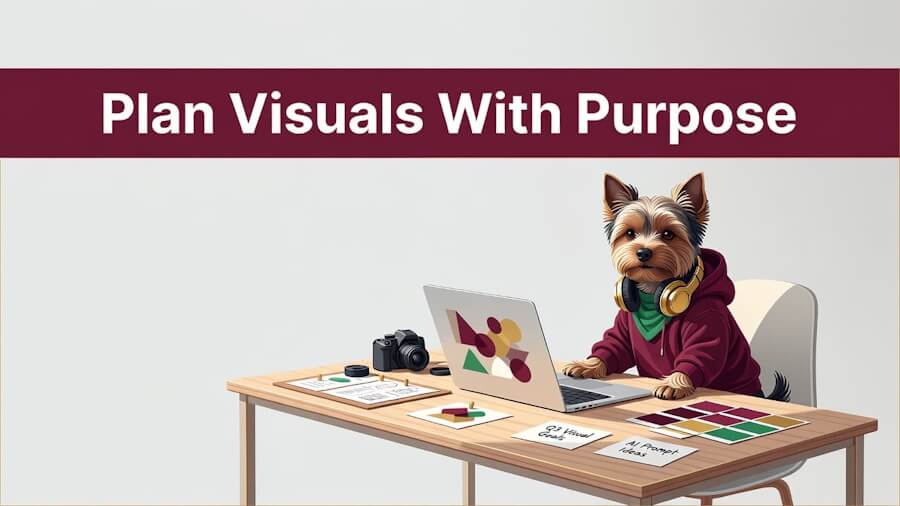
For example, here is a prompt for a Yorkie content creator representing a visual content strategy:
Social media graphic for a visual content strategy service. Show exactly one young Yorkshire terrier, a Yorkie content creator, sitting naturally at a clean modern desk while planning AI-generated visuals. The Yorkie wears modern creator clothing: a fitted deep burgundy hoodie, small warm-gold headphones resting around the neck, and a subtle soft-green accessory. Place one laptop on the desk with a simple abstract visual collage on screen, no readable interface text. Include a small camera, a mood board, color swatches, and a few neat content-planning notes. The Yorkie looks focused, creative, and confident. Use a polished editorial illustration style with warm natural window light, soft shadows, and a clean neutral studio background. Use deep burgundy as the main brand accent, with warm gold highlights and soft green details. Place the Yorkie and desk in the lower right, with generous empty space in the upper left for a headline. Add the exact text “Plan Visuals With Purpose” in bold, clean white type. No extra words, no random letters, no logos, no watermark, no clutter, no extra animals, no extra people, no distorted paws, no extra limbs.
In RightBlogger’s AI Image Generator, you can select your brand colors and add text to the image as part of the creative process. For New Horizons 123, I use deep burgundy (#6B1727), warm gold (#F7CC5F), and soft green (#68A868) to keep the result on-brand. Always review generated text for spelling and spacing before publishing.
Here’s the result:
Fix The Details That Usually Break The Design
Most weak outputs from an AI art generator don’t fail because the tool is bad. They fail because the AI image prompt ignores small details.Many of those small problems become AI image fails, such as distorted hands, fake text, warped logos, and unwanted objects.
The first problem is adjective overload. When an AI image prompt says sleek, bold, elegant, vibrant, cinematic, minimalist, futuristic, cozy, and premium, the result often looks confused. Use a clear prompt structure with two or three strong style signals instead. For example, a portrait prompt might choose either warm editorial lighting or sleek studio photography, not both. Tools such as Midjourney may interpret style adjectives and exclusions differently, so keep the direction focused.
The second problem is forgetting copy space. Social graphics usually need text added after the image is made. Ask for negative space in the AI image prompt so the subject doesn’t fill every inch of the frame.
Another common issue is using an AI art generator for text-heavy graphics. That’s still a rough bet. Models can fake lettering, but they often mangle it. Add real type during photo editing, and use a negative prompt to reduce clutter, fake text, or unwanted objects. The image should support the message, not try to typeset it.
When the finished graphic includes an offer, instruction, or important message, write alt text for the marketing graphic so screen reader users can access that context too.
Color also goes wrong fast. Listing six brand colors doesn’t help if the prompt never explains how they should appear. Use one lead color, one accent, and an overall tone, then correct color or typography during photo editing if needed. If the palette feels off, test combinations in Adobe Color.
Then there’s the problem no one likes to talk about, generic stock energy. Too many prompts create the same smiling people, floating icons, glossy 3D rendering, and polished nonsense. Reverse engineer the scene from a specific brand moment instead of starting with “business success.” These prompt examples are stronger: a founder’s desk, a clean product flat lay, or an abstract branded background with geometric shapes and soft light. A better AI image prompt makes that scene specific from the start.
Specific beats generic every time.
Turn One Strong Prompt Into A Repeatable System
Once you get one AI image prompt right, don’t start from scratch for every post. Turn it into a reusable brand asset. This is one practical way small businesses can use AI-created visuals for business without relying on generic stock imagery.
Keep the core instructions in each AI image prompt the same. Change only what needs to move. That might be the campaign theme, seasonal color accent, background object, or image crop. Now you have consistency without sameness.
A repeatable prompt structure might keep these elements fixed:
- The overall style and mood
- The main palette
- The lighting direction
- The amount of negative space
- The list of things to avoid
Keep this core structure portable across Midjourney, Stable Diffusion, and DALL-E 3. Then rotate the campaign variables for each platform, offer, or recurring series. One version becomes a quote card background. Another becomes an Instagram carousel cover. A third becomes a clean still for an AI video opening frame.
You can also reverse engineer a successful graphic into a reusable template. Identify its fixed brand variables, then separate them from the changing details.
This is where a searchable prompt library helps. Store each tested AI image prompt and label it by platform, offer, audience, and mood. An image prompt generator can help draft variations, but save human-edited prompts instead of unedited machine output.
To organize reusable prompts, approved examples, and brand assets in one place, see our guide to building an AI image library that looks like your brand.
For recurring people or campaign characters, add optional fields for character consistency or a portrait prompt. These fields aren’t necessary for every social graphic, but they help maintain a familiar look across a series.
After a while, you’re not guessing. You’re editing.
That shift matters. Random prompt writing wastes time. Reusable AI image prompt systems make content production lighter, faster, and more consistent.
Frequently Asked Questions About AI Image Prompts
How long should an AI image prompt be?
Long enough to be clear, short enough to stay focused. A useful AI image prompt covers the subject, composition, style, color, format, and exclusions without filler. These prompt examples can help you find the right level of detail.
Should I include brand colors by hex code?
You can, but plain language often works better first. Name the dominant color family, accent color, and mood. If exact matching matters, use the generated image as a base and fine-tune the colors in your design software.
Can AI-generated social graphics include text?
They can, but the text often comes out wrong. Create the image without readable text, then add the headline, offer, CTA, logos, and final layout during photo editing.
How do I keep prompts consistent across a team?
Use a shared prompt structure with brand rules, palette notes, crop guidance, and exclusions. The same brief can adapt to Midjourney, Stable Diffusion, Adobe Firefly, and DALL-E 3, although each tool may use different syntax. Keep prompt examples in one shared document so everyone has the same starting point.
Can I learn from an existing visual?
Yes. Use an image to prompt the workflow to reverse-engineer general composition, lighting, and palette cues. Avoid reproducing protected brand assets, logos, or distinctive creative work too closely.
How can I keep a person or recurring character recognizable?
Start with a clear portrait prompt that defines identity, expression, styling, and setting. A reference photo can help, but recognizable results may still require several iterations.
Are the same prompts useful for AI video projects?
Yes, especially for scene planning and keyframes. A well-built AI image prompt can guide still graphics and matching AI video content. It helps maintain the brand look without unnecessary visual drift.
AI Image Prompt: Final Thoughts
The best AI image prompt doesn’t chase novelty. It gives generative AI clear direction, so an AI image generator becomes more predictable.
A useful prompt structure carries brand rules, visual intent, and platform requirements. It also gives small businesses a clearer way to use AI for creative projects without losing their own point of view. You can reverse-engineer successful outputs, then feed those lessons back into your process, making each AI image prompt more usable.

As a Visual Digital Marketing Specialist for New Horizons 123, Julie works to grow small businesses, increasing their online visibility by leveraging the latest in internet and video technologies. She specializes in creative camera-less animated video production, custom images, content writing, and SlideShare presentations. Julie also manages content, blog management, email marketing, marketing automation, and social media for her clients.


0 Comments