
This is a repeatable content marketing plan for turning one post into five short clips with AI visuals. First, pull out five angles, not five watered-down recaps. Then write five quick scripts and format each one for vertical video (9:16), with fast pacing, captions, and safe-area spacing so buttons don’t cover your text.
Keep the edits sharp, the on-screen text clean, and the message focused on one point per clip. That’s what gets saves and shares, not a fast swipe past. For the bigger picture, see how visual content marketing combines images, graphics, and videos in a small business content plan.
Turn Blog Posts into Short Videos by Picking Five Video Angles From One Post (So Each Clip Feels New)
If you create five “summaries,” you’ll get five boring videos. Your target audience can smell that from three swipes away, which is why choosing different angles matters for viewer retention.
Instead, scan the post for different promises. Here’s a simple way to do it, starting the content conversion process by pasting the URL to video into an AI tool or manually:
First, highlight anything that could stand alone, a hot take, a stat, a step, a mistake, a tiny story, a quote, a before/after. Next, group those highlights into five buckets for visual storytelling. Then name each bucket with one clear sentence: “This video helps you do X.”
That’s it. Five buckets, five videos, five different reasons to watch.

This is also the cleanest way to repurpose blog posts without making your feed look like copy-paste soup, turning them into fresh, engaging clips every time.
Use These Five Angle Types to Turn Blog Posts into Short Videos: Hook, Stat, Tip List, Common Mistake, Mini Case Study
Each angle is a different entry point, and that’s why they don’t feel repetitive.
- Hook: A surprising opener that flips a common belief. Prompt: “Turn this paragraph into a 20-second hook video with a surprising first line, then one insight, then next step.”
- Stat: One number that creates urgency, with one plain-English meaning. Prompt: “Pull the strongest stat, explain what it means in 10 seconds, then give one action step.”
- Tip List: Three quick tips, each with a mini example. Prompt: “Make a 25-second countdown script, one tip every 5 seconds, end with ‘save this.'”
- Common Mistake: Call out the wrong move, then show the fix. Prompt: “Write a mistake-and-fix script with a ‘you might be doing this’ opener.”
- Mini Case Study: Before, after, lesson. Prompt: “Turn this section into a 30-second case study with one metric, one cause, and one takeaway.”
Short-form structure stays the same: problem, insight, next step.
Turn Each Angle Into A One-Sentence Video Promise And A Clear CTA
A video promise keeps your script from wandering. Use this format:
“In 15 seconds, you’ll learn X so you can do Y.”
Then match the CTA to the clip’s job:
Save, follow, comment a keyword, or “want the checklist?” Keep it simple. Also, each video should answer only one question. Trying to answer three questions at once makes the clip harder to follow.
If you want help keeping your voice sharp while using AI, this pairs well with AI tools boosting content creator efficiency.
If the promise doesn’t fit in one sentence, the video is too big. Shrink the idea, not the font.
A Repeatable Video Production Process: AI Video Workflow From Script To Post (Fast, Clean, Consistent)
You don’t need a complicated production pipeline. You need a weekly loop you’ll actually do.
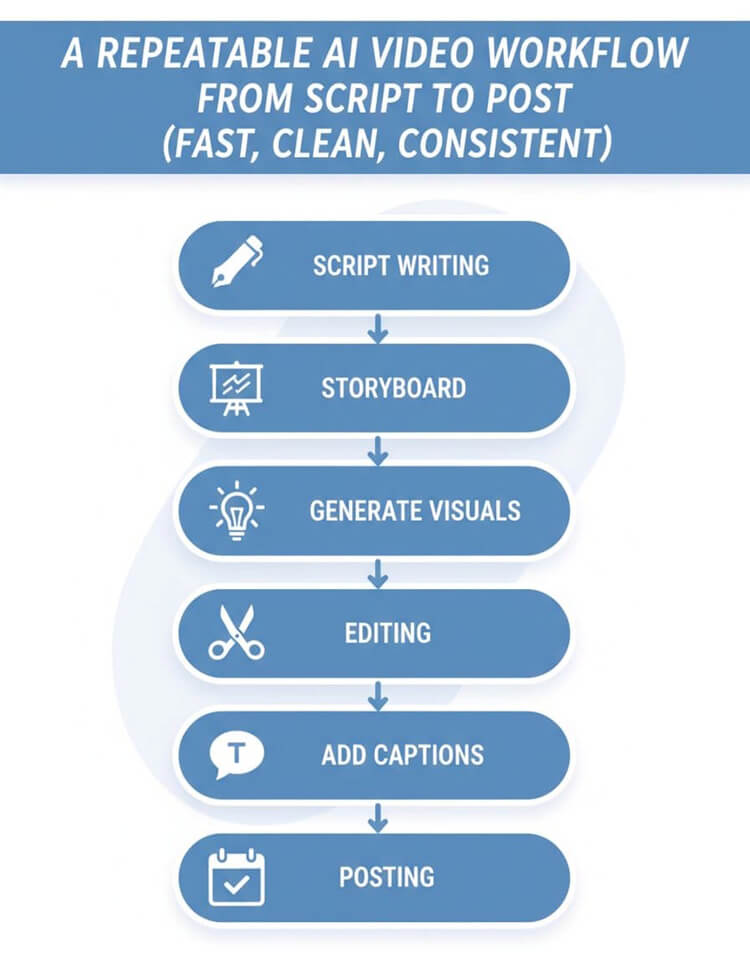
Start by writing five video scripts, one per angle. Keep them punchy, then build a quick storyboard so the edit is mostly assembling, not suffering. After that, generate or collect visuals (AI-generated video scenes from text, stock clips, icons, charts), drop them into a 9:16 timeline using video editing tools, add captions, then package variations for each platform.
If you want more examples of how other creators turn written content into Shorts, see turn blog posts into Shorts in 2026.
Plan Your Script, Storyboard, and Assets
Use this simple video script formula to keep your message focused:
Hook (1 to 2 seconds), Value (3 beats), Proof, CTA. If you need help building that structure from scratch, use these short-form video script ideas as a starting point.
- Hook: One line of tension or curiosity.
- Value (3 beats): Three short points, like stepping stones.
- Proof: A quick reason to trust it (result, mini example, or “here’s what to watch for”).
- CTA: Save, follow, comment, or grab the next resource.
Storyboard it in 6 to 8 scenes. Keep on-screen text to one short line per scene. Add a note for each scene: AI visual idea (abstract motion, icon animation, chart pop-up, product mockup) plus any brand elements that stay consistent (colors, type style, corner logo, caption style).
Edit And Captions Best Practices to Turn Blog Posts into Short Videos (9:16, Safe Areas, Pacing, Subtitles)
Lock in the 9:16 aspect ratio, then design for thumbs and platform UI.
Keep key text away from the edges, since buttons and captions now cover more space. Use large fonts, high contrast, and short lines. Aim for one idea per clip, and use pattern interrupts every few seconds (zoom, cut, icon pop, quick chart, word highlight) to keep the viewer’s brain from wandering.
Captions and subtitles matter for sound-off viewing and for accessibility. Burn them in, and keep them synced and readable. For a practical rundown of 2026 short-form editing habits (including pacing and safe zones), use repurposing best practices in 2026.
Five Ready-to-Use Short Video Templates You Can Copy Today
These video templates are perfect for creating short instructional and explainer videos with AI-generated visuals, stock clips, motion graphics, kinetic text, and simple animations. No talking-head video or filming required; leverage AI avatars as a creative replacement for traditional talking heads, text-to-video generation, and voice-over narration instead.
Template 1: The 15 Second Hook That Stops The Scroll
Ideal length: 12 to 18 seconds Structure: Hook, one insight, one next step, CTA Example script: “Most people waste time summarizing posts. Don’t. Pick one angle, make one promise, and build visuals around it. Save this and make your next five clips in one hour.” On-screen text: “Stop summarizing” then “Pick one angle” then “One promise” AI b-roll ideas: Fast abstract motion backgrounds, bold kinetic text, simple icon pops.
For TikTok, go punchier in the first line. For Reels, keep it clean and aesthetic. For Shorts, make the words extra readable.
Template 2: The Single Stat With A Quick Breakdown
Ideal length: 15 to 25 seconds Structure: Stat, what it means, what to do next, CTA Example script: “One strong stat beats five weak points. Put the number on screen, explain it in one sentence, then give one action step. Comment ‘STAT’ and I’ll send a script formula.” On-screen text: Big number first, then “What it means,” then “Do this next” AI b-roll ideas: Simple animated bar chart, number counter animation, minimal background loop.
Verify sources before you post. Keep claims accurate. TikTok likes speed, Reels likes polish, Shorts likes clarity.
Template 3: The Three Tips Countdown With Pattern Interrupts
Ideal length: 20 to 35 seconds Structure: Tip 3, Tip 2, Tip 1, CTA Example script: “Three ways to turn one post into five clips. Start with a common mistake and show the fix. Next, explain one useful statistic. Finally, write a one-sentence promise for each clip. Save this for your next batch.” On-screen text: “3,” “2,” “1” plus one short line per tip AI b-roll ideas: Matching icons per tip, quick stock clips, animated checkmarks.
Hit one tip every 4 to 6 seconds. TikTok can handle faster cuts, Reels likes smoother transitions, Shorts rewards tight pacing.
Template 4: The Common Mistake And The Fix
Ideal length: 15 to 30 seconds Structure: Wrong way, right way, mini example, CTA Example script: “You might be doing this: turning one post into five identical clips. Here’s the fix: pick five angles, then write five different promises. Comment ‘ANGLES’ if you want the angle list.” On-screen text: “Wrong” (red X) then “Fix” (green check) AI b-roll ideas: Split-screen layout, red X and green check animations, quick before/after cards.
TikTok loves the call-out. Reels likes clean design. Shorts likes fast proof.
Template 5: The Mini Case Study In 30 Seconds (Before, After, Lesson)
Ideal length: 25 to 40 seconds Structure: Before, after, what changed, CTA Example script: “Before: one blog post, one week of silence. After: five short clips from the same post, posted across three platforms. Lesson: one idea becomes many entry points. Follow for the weekly workflow.” On-screen text: “Before,” “After,” “Lesson” AI b-roll ideas: Timeline animation, blurred analytics-style background, simple metric callout.
TikTok wants the story tight. Reels wants it pretty. Shorts wants the lesson obvious.
Publish Everywhere, Track The Right Metrics, And Improve The Next Batch to Turn Blog Posts into Short Videos
Batch creation is only half the win. Distribution is where the results show up. Post the five videos as a series over 7 to 14 days. Keep filenames and project names consistent (Topic_Angle_Platform_Date) so you can find things later, because Future You deserves nice things.
Use a short caption that repeats the promise, then add a pinned comment with the CTA (keyword, checklist, or “which angle should I do next?”). If a clip performs, recycle it with a new hook and new visuals.
If you want examples of what scroll-stopping AI shorts can look like, browse this AI-generated short video clips portfolio.
A Simple Republish Plan That Avoids Duplicate Feeling Content
Keep the core idea the same, but change the first two seconds and the caption per platform. Swap b-roll, change on-screen text, and rotate CTAs. Stagger posts by 24 to 72 hours so each platform gets a “fresh” version, not a same-day copy.
Metrics That Matter For Short Videos And A Weekly Iteration Loop
Track watch time, average view duration, retention curve, replays, saves, shares, follows per view, and link clicks (where available). Then do a 20-minute weekly review: pick one winner to remake, one fixer to re-edit, and one new test angle.
For more on scaling repurposed content without it feeling spammy, use repurpose video content in 2026.
Turn Blog Posts into Short Videos: Key Takeaways: Your One Post To Five Videos Checklist
- Pick five angles, not five summaries.
- Write one promise per video, and answer one question only.
- Use a simple workflow: script, storyboard, assets, edit, captions, post.
- Stick to proven templates (hook, stat, tips, mistake, mini case study).
- Edit for 9:16, safe areas, high contrast, and burned-in subtitles.
- Republish smart by changing hooks, visuals, and captions per platform.
- Review metrics weekly, then remake the winner.
FAQ: Turn Blog Posts into Short Videos
Can I use my own blog post content anywhere?
Yes, if you own it. Be careful with guest posts or client work with usage limits.
What about quoting other sources?
Keep quotes short, cite the source on screen when possible, and don’t build the whole video out of someone else’s work.
Can I use AI voice, and what should I disclose?
Most platforms allow it, but be transparent if the voice could mislead viewers. Also, avoid using a real person’s voice without permission.
Is stock footage allowed, and how do licenses work?
Stock is fine if you have the right license for social and ads. Save receipts, and don’t assume “free” means “commercial use.”
How long should each video be?
Aim for 15 to 35 seconds for most clips. Use 30 to 45 seconds for mini case studies.
What is the best CTA for short videos?
“Save this” for tips, “comment a keyword” for lead capture, and “follow” for series content.
Do hashtags still matter in 2026, and how many should I use?
They help a little. Use 3 to 6 relevant tags, not 25 random ones.
How often should I post to see results?
Start with 3 to 5 posts per week, then adjust based on what you can sustain.
Final Thoughts: Turn Blog Posts into Short Videos
Pick one existing post today. Not your “someday” post, your already-published one. Choose five angles, write five one-sentence promises, craft a video script for each, record the voiceover, and generate clips using AI avatars and your favorite AI video generator to build the first batch in one focused session. It’s way easier to improve a real video than to perfect an imaginary one, especially with this streamlined video production process.
Save the templates, then track one metric to improve next week (usually retention or saves) while maintaining professional quality. Want a simple next step? Create a one-page checklist from this post, then use it every time you ship a new batch for your target audience.
Ready to Turn One Blog Post Into Multiple Videos Faster? Try RightBlogger
If you want to speed up this process, RightBlogger can help you turn a single blog post into several short video ideas without starting from scratch each time.
I used RightBlogger to help with video concepts, hooks, scripts, images, tags, and other assets, making this workflow much easier to repeat.
If you want a faster way to repurpose your blog content into TikToks, Reels, and Shorts, take RightBlogger for a free ride!

It’s a simple way to create more content from what you already wrote.

As a Visual Digital Marketing Specialist for New Horizons 123, Julie works to grow small businesses, increasing their online visibility by leveraging the latest in internet and video technologies. She specializes in creative camera-less animated video production, custom images, content writing, and SlideShare presentations. Julie also manages content, blog management, email marketing, marketing automation, and social media for her clients.




0 Comments