
Visual content link building can help small business owners and solo digital marketers earn high-quality backlinks without competing directly with large brands and their bigger budgets.
A useful visual can give publishers a clearer reason to cite your page than a generic blog post alone. By using engaging visuals as part of a broader content strategy, visual content link building can support both modern content marketing and search engine optimization.
Charts, diagrams, and short AI-created explainers can make hard ideas easier to understand. You don’t need a camera crew or a giant design budget to make them. You do need accurate information, a clear reason for someone to share it, and a plan to get it in front of the right people.
Start with the question your audience keeps asking.
Visual Content Link Building Key Takeaways
- Useful visuals give publishers a reason to cite your website, but the information behind them must hold up.
- Original charts, diagrams, checklists, and AI-created explainers work best when each makes one idea clearer.
- Publish the visual on a page with context, sources, and an easy way to credit it.
- Contact a small group of relevant publishers with a personal, helpful pitch.
- Judge progress by relevant referring sites and useful visits, not total backlink count.
How to Earn Backlinks With Visual Content for Small Businesses
The basic play is simple: answer a question well, show the answer clearly, and give other publishers a useful page to cite. A backlink is a link from another website to yours. A sound link building strategy prioritizes relevance and editorial links over sheer volume. For a small business, that can build sustainable organic search traffic and support search engine rankings, not just improve domain authority. A digital marketer can help keep that focus on useful, relevant resources.
Google says links help it discover pages and assess relevance. That doesn’t mean every visual will earn links or move rankings. A visual needs a job beyond looking good.
Choose Visual Formats Publishers Can Cite
Match the format to the information. Put original data in a chart with clear labels. A multi-step service process may work better as a diagram. Comparisons need a graphic that makes the differences easy to spot without squinting.
Infographics, checklists, and short animated explainers also have their place. A well-sourced visual can earn an editorial citation when it helps a publisher explain something to readers.
The same rule applies to video. A focused explanation with a source page is easier to cite than a clip that relies on looks alone. The site’s guide to creating link-worthy videos explores how useful information gives video a stronger reason to be referenced.
Use AI Visuals With a Clear Purpose and Human Review
AI can help you make custom illustrations, animate a process, or turn an existing explanation into a short video. No filming required. That makes production more manageable when your team is small and your schedule is already full.
But an AI-generated image of a handshake won’t teach anyone much. Give the tool a useful brief: what the viewer needs to understand, which facts must appear, and what to leave out. Then review the result.
Before publishing a generated visual, use our AI brand safety checklist to review claims, permissions, and context.
Your expertise is the valuable part. AI helps present it. For a wider look at planning visuals around a real message, see this visual content strategy for brands.
Build a Practical Visual Content Link Building Plan
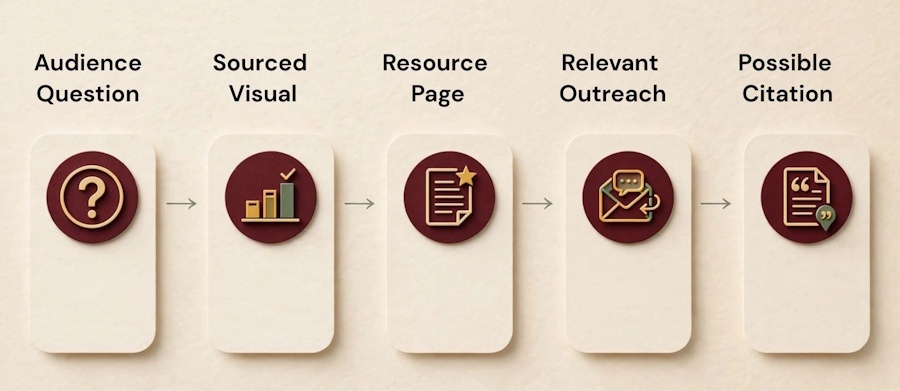
A useful visual needs a clear question, reliable sources, a page worth citing, and outreach to publishers whose readers could benefit.
Ready to make something? Resist the urge to open a design tool first. For visual content link building, a small team gets more mileage from one useful resource than a folder of graphics nobody asked for.
Find Topics and Publishers With a Reason to Link
Start with customer questions. Look at support emails, sales calls, and the points people ask you to explain twice. Then review industry reports and competitor resources. Review competing resources for missing data, outdated visuals, or explanations you can clarify.
Make a short list of places that serve the same audience: relevant bloggers, local organizations, trade groups, journalists, and resource pages. Read each page before adding it to your list. If your visual wouldn’t help its readers, skip the pitch. Local resource pages can be especially valuable for regional businesses focused on local SEO.
Generic influencer outreach and mass guest posting rarely match the value of a relevant resource. For other ways to find a natural fit, Ryan Robinson’s small-business link-building strategies offer useful context. Keep the contact list short and relevant.
Create a Useful Asset From Facts, Expertise, or a Strong Explanation
Gather your source material before designing. Use your own observations and process knowledge where you have them. When using public research, check the original source and keep a record. Charts need readable labels and source notes; infographics need enough context to prevent misinterpretation.
For a claim-by-claim review of AI-assisted research, see our guide to fact-checking AI content before it goes live.
Publish the finished asset on a landing page you control, with the explanation behind it, links to sources, and a text summary or transcript when helpful. A clean page gives publishers a specific source to cite, not a file to copy.
Make the page address easy to copy and include a simple credit note, so publishers know where to send readers.
Example: Turn an AI Character Into a Reusable Storyboard
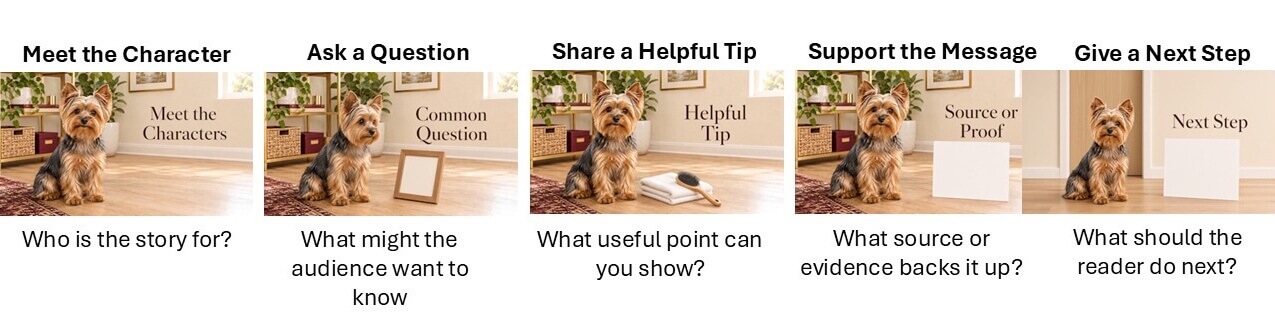
These five AI-generated images show how a small business could plan a short visual story around a fictional Yorkie. The sequence introduces a character, raises a customer question, shares a helpful tip, points to a source, and ends with a next step. This is an illustrative example, not a real client project or a claim about pet care. A business could adapt the same structure for its own audience, then add verified information and sources.
For tips on keeping a recurring mascot recognizable across images, see our guide to AI character consistency for brand campaigns.
Visual Content Link Building: Make Outreach Personal and Helpful
Keep your email short. Mention the recipient’s relevant article or resource page, explain the gap your visual fills, and share the direct link to your source page. Give them room to decide whether it fits.
For example: “I saw your article about [specific topic]. We made a sourced diagram that explains [specific gap]. If it helps your readers, here is the full page and its sources: [URL].” This turns the advice into something readers can use.
One polite follow-up can make sense if the resource genuinely helps their audience. Avoid buying links to manipulate rankings or sending the same link request to dozens of sites. Google’s spam policies for Search remind you to focus on value for readers, not manufactured links.
Help Publishers Find and Share Your Visuals
Publishing is the halfway point. Your resource also needs to make sense beyond your inbox, especially when someone finds it through search or sees a small piece elsewhere.
Improve the Page’s Search Visibility and Accessibility
Give the page a descriptive title and readable URL. Write a short introduction that explains what the visual shows and who it helps. Use plain language so people don’t have to decode the image alone, and place source notes or attribution instructions nearby.
For images, write alt text that conveys useful information rather than stuffing it with keywords. Put detailed chart findings in nearby text when alt text would become unwieldy. For multimedia elements, add captions, transcripts, or text summaries.
Links need to make sense, too. The W3C’s guidance on descriptive link purpose explains why readers should understand where a link goes from its wording and context. “View the full comparison and sources” is more helpful than “click here.”
Promote Visuals Where Your Audience and Publishers Already Are
A digital marketer or content creator can share visual snippets across targeted social media channels to build brand visibility. Share the page in your business newsletter, too, and bring it into relevant community discussions when it answers a real question. Send it directly to publishers on your short list.
Link social posts to the full resource page so readers can see the visual, context, and sources. A social share may put it in front of a writer, but it isn’t a website backlink.
Give researched assets a longer life by pulling a finding into a social graphic or turning a process diagram into a short AI animation. The site’s advice on repurposing video content can help you make smaller pieces useful without rebuilding the whole idea each time.
Measure Results and Keep Your Link Building Strategy Healthy
Use Google Search Console’s Links report to see which pages receive links. Check analytics for visits from linking sites. Tools such as Ahrefs or Moz can add detail, but their authority scores are third-party estimates, not Google metrics.
Look at referring domains, the individual websites sending links. Open each linking page. Does its topic fit yours, and does it credit the visual accurately? Check whether the link leads to your resource page, with sources and explanation, rather than to an image file without context.
Check analytics for referral traffic and what those visitors do next. Track visits to the resource page and its search queries over time. Don’t assume one visual will improve local rankings. A relevant trade-group resource page may bring more interested visitors than irrelevant links, so link count alone isn’t enough.
If a source updates its figures, refresh your chart and page copy, and fix broken source links or outdated screenshots. Make revisions clear so publishers can trust what they’re citing.
Give a new resource time to circulate. If the right people saw it but didn’t use it, ask what was missing. Maybe the chart needs a clearer source. Or, maybe the pitch reached the wrong audience. Those are fixable problems, and they’re more useful than chasing another hundred names for your contact list.
Visual Content Link Building Frequently Asked Questions
Do Infographics Help Visual Content Link Building?
Yes, when they make original, accurate information easy to use. A concise, well-sourced infographic can help a publisher explain a specific fact or process. A generic graphic is unlikely to earn a link on its own.
Can AI-Generated Visuals Earn Quality Backlinks?
They can. Have a person check the facts and the final design. Give readers a source page where they can verify the claims.
How Can a Small Business Earn Links Without a Large Budget?
Start with one audience question you can answer from your expertise or reliable research. Create an accessible, well-sourced visual, then share its page with a few relevant publishers.
Do Social Media Shares Count as Backlinks?
A social post is exposure, but it isn’t the same as a relevant citation from another website. Someone who discovers your visual on social media may later link to its source page in an article or resource list. Make that page easy to find, and don’t count a share as an earned link.
Visual Content Link Building Final Thoughts
A small business can start with one audience question. Create a clear, well-sourced visual, publish it with an explanation, and share it with a few relevant publishers. Keep it current and measure useful visits, not just link counts.
Create a Visual Worth Sharing With RightBlogger
- Use Keyword Research to find a question your audience wants answered.
- Try the AI Image Generator to create a custom illustration for your idea.
- Use the Article Writer to draft the page that explains your visual. Add your sources, check every claim, and review the image before publishing.
A useful visual starts with your expertise. Explore RightBlogger’s tools to bring your idea to life, then give publishers a clear, well-sourced page they can cite.


As a Visual Digital Marketing Specialist for New Horizons 123, Julie works to grow small businesses, increasing their online visibility by leveraging the latest in internet and video technologies. She specializes in creative camera-less animated video production, custom images, content writing, and SlideShare presentations. Julie also manages content, blog management, email marketing, marketing automation, and social media for her clients.




0 Comments