
Alt text for marketing graphics often gets treated like a tiny field to fill right before publishing. Bad move. If your graphic carries an offer, a result, a price, or a call to action, that little field carries part of the message too.
People who use a screen reader do not get the glossy layout, bold color choices, or clever AI visual. They get words. Search engines get those words as context, but people come first.
Here is how to make your visual content clearer, more inclusive, and easier to find without turning every alt field into keyword soup.
Alt Text Marketing Graphics Key Takeaways
- Write alt text around the graphic’s purpose and message, not every visual detail. Include the offer, result, instruction, or next step a reader would otherwise miss.
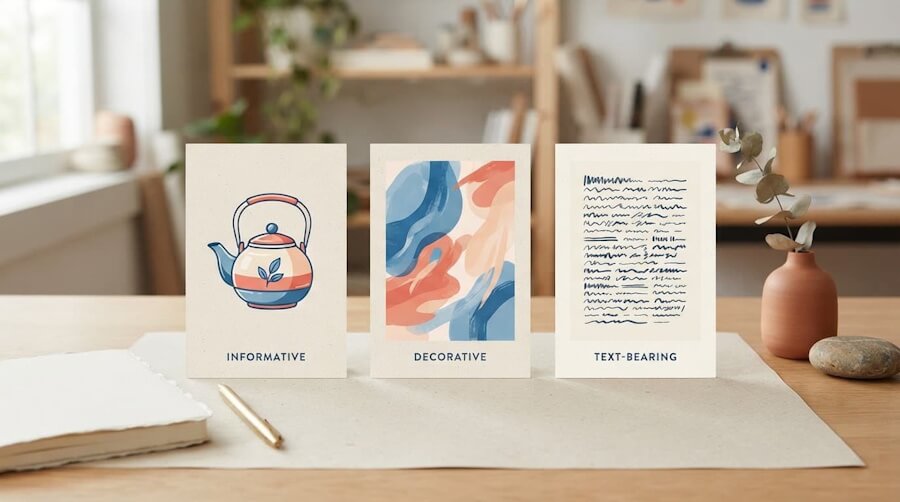
- Classify each graphic first: informative images need useful descriptions, functional images need action-based descriptions, and decorative images should use
alt="". - Keep essential promotional copy in HTML, email text, or captions instead of hiding it only inside an image. Alt text supports readable copy; it does not replace it.
- Use clear, unique descriptions and relevant keywords only when they fit naturally. AI can provide a first draft, but a human should review the final visual, message, and context.
- Check alt text everywhere the campaign appears, including websites, email templates, and AI-generated visuals, so the message still works when images are blocked.
Alt Text Marketing Graphics Need To Carry The Message
Alternative text, usually called alt text, is a short written replacement for an image. It appears when an image cannot load, and it gives assistive technology something meaningful to announce.
The WCAG 2.2 accessibility guidelines and Section 508 both emphasize meaningful text alternatives for non-text content. In plain English, those WCAG guidelines point to a simple rule for informative images. Alt text should include the offer, result, or instruction your audience needs.
A Screen Reader Needs the Message, Not Every Pixel
Don’t describe every color, font, shadow, and floating sparkle. That’s not helpful. It’s like describing the wrapping paper while ignoring the gift.
Describe the graphic’s purpose in the moment.
If a blog image promotes a guide about email planning, write what the guide offers. If a product graphic shows a new insulated bottle, mention the bottle and the key feature. If a visual is a clickable button, describe the action it performs.
If someone would miss the offer, proof, instruction, or next step without the graphic, include it in your alt text.
Classify Each Graphic Before You Describe It
Before writing anything, ask one question: What would the reader lose if this image disappeared?
If the answer is “nothing,” the graphic may be decorative. If the answer is “the offer,” “the result,” or “the instruction,” it’s an informative image that needs a real description. Functional images need descriptions of the actions they perform.
Informative Graphics Need The Point
Marketing visuals are often informative, even when they look simple. Social media posts, quote cards, product images, before-and-after graphics, charts, and AI-generated scenes can all carry meaning.
Say the useful part first.
A weak alt text example might read: “Social media graphic.”
A stronger version could read: “Graphic promoting a five-step social media planning checklist for small businesses.”
The second version gives the reader the actual takeaway. It also gives search engines honest context. No mystery meat. No fluff.
Complex images, such as charts, may need a summary plus nearby data or supporting text.
For images created with generative AI, review the finished visual before writing its alt text. Don’t describe the prompt you typed. Describe what people can actually see. AI can change the product color, invent an object, or produce a scene that wandered off-script. It happens.
Before you generate those visuals, use these AI image prompts for brand-ready social graphics to define the visual’s purpose and leave room for real copy.
Decorative Graphics Need Silence for Alt Text Marketing Graphics
Background images, divider lines, color splashes, and random swooshes don’t need a narrated biography. In custom code, decorative images should use an empty alt attribute: alt="". A screen reader should skip them.
Do not write “blue decorative swoosh” or “pink sparkle design.” That still creates noise. People shouldn’t have to sit through your confetti.
Put The Important Words Outside The Pixels with Alt Text Marketing Graphics
A text-packed graphic can look great in a feed. It can also become a locked door. If your sale date, customer result, webinar topic, or call to action only appears inside an image, some people will miss it. So will people whose email clients block images.
The W3C guidance on images of text recommends using real HTML text instead of graphical text baked into an image whenever you can. A logo is a reasonable exception. Your entire promotion is not.
Repeat The Essential Copy In HTML
Put the most important words in the page copy, email body, or social caption. Then use alt text to support the visual.
For example, an image might say “15-Minute Website Audit.” The surrounding content should also state that offer in readable text. The image alt text can say, “Offer for a 15-minute website audit.”
This isn’t duplication for duplication’s sake. It follows accessibility best practices and gives actual humans a backup plan.
A customer testimonial graphic needs the same treatment. Keep the approved quote or result in the body copy or image captions. Alt text supports that proof, but it doesn’t replace it. Never let one pretty image carry the full burden of proof.
Alt Text Marketing Graphics: Write For Search Without Keyword Soup
When you plan alt text for marketing graphics, keep the page, filename, caption, image, and description aligned with the visual content to give search engines useful context. It also keeps your copy from sounding like it was written by a blender full of search engine optimization plugins.
Good image descriptions support websites built for humans and search engines.
These descriptions work best when they are clear and unique. A single accurate phrase beats a stack of repeated keywords every time. Here is what that looks like:
| Graphic Type | Generic Description | Purposeful Description |
|---|---|---|
| Product image | “Water bottle” | “Green insulated water bottle with a leak-resistant lid” |
| Data chart | “Marketing chart” | “Bar chart comparing email open rates across four campaigns” |
| Blog promotion | “SEO graphic” | “Graphic promoting a guide to writing image descriptions” |
| Decorative divider | “Gold line” | alt="" |
The goal is not keyword stuffing. Describe the graphic in a way that makes sense on that page, rather than cramming in every search phrase you can think of. For more help connecting visuals with search intent, see these visual search optimization techniques.
Punctuation in Alt Text Marketing Graphics Lets The Copy Breathe
A screen reader speaks alt text aloud. Commas and periods make descriptions easier to follow, especially when they include a product name, a price, or a short list. Keep it tight. Use normal sentence structure. Skip phrases like “image of” or “picture of” unless the format itself matters.
“Image of a woman holding a planner” is weaker than “Small-business owner reviewing a weekly content planner.” Get to the point.
Use AI For A First Draft, Not A Final Answer
Generative AI can save time when you have dozens of visual variations. Let it suggest a starting point, then have a human review the alt text. Ask yourself: Does this describe the final image? Does it state the message? Would it make sense when read by a screen reader without the visual nearby?
f your campaign uses a recurring person, mascot, or AI character, build AI character consistency into your review process too.
Before you publish an AI-created graphic, make sure the image itself is clear and usable. These AI image prompts for brand-ready social graphics can help you start with a stronger visual.
A roundup of AI description tools for WordPress can help with the first pass. Still, no tool knows your campaign goal, customer language, or brand promise as well as you do.
The same rule applies to AI-generated video campaigns. Treat the thumbnail as its own image, write useful alt text for it on your website, and keep the main message available in nearby written copy or captions. Do not let motion or pretty visuals hide the point.
Add Alt Text Where Your Campaign Lives
Every platform handles alt text a little differently. The standard stays the same: meaningful graphics need meaningful descriptions.
Website Graphics And AI Visuals
In your CMS, fill in the alt field when you upload a meaningful image. Use clear filenames too, such as green-insulated-water-bottle.jpg, not IMG_8842.jpg.
Alt text describes an image; social-sharing metadata selects the image shown with a link. See this guide to link preview images for the difference.
Keep important promotional copy in HTML text on the page, not only inside the image. Alt text works best when it is part of an effective visual content strategy, not a last-minute upload task.
For custom HTML, add an alt attribute to each meaningful <img> element. Decorative images get alt="".
Graphics created with generative AI need the same quality check as any other asset. The message should be clear, the brand should feel like your brand, and the visual should not make promises your business cannot support. Before publishing, fact-check AI content and confirm the graphic, its caption, and its alt text all match.
These visual content rules for effective marketing help keep the basics in place.
Organizations that need to meet Section 508 should include these checks in their accessibility review.
Email Graphics Must Still Work Without Images
Marketing emails expose weak alt text fast. In email marketing, image blocking can leave a giant graphic with all your offer copy as a big blank rectangle. Some email clients may suppress images entirely. Not cute.
Mailchimp supports alt text in image blocks and custom-coded templates. Its guide to alt text in email campaigns covers the available options.
Keep the offer, deadline, and call to action in live email text. Alt text is a helpful backup, not a replacement for readable copy. Test marketing emails across email clients before sending.
Final Thoughts About Alt Text Marketing Graphics
The best alt text does not try to impress anyone. It gives people the same reason to care that a sighted reader gets in a few seconds.
Review the final graphic, name the message, leave decoration silent, and let your alt text carry the meaning while important words stay outside the pixels. That is image accessibility in practice; Accessible marketing means digital content that does not leave people behind.
Alt Text Marketing Graphics FAQs
What Is Alternative Text?
Alternative text, usually called alt text, is a written description attached to an image. A screen reader can announce it, and it can appear if the image fails to load.
Should Alt Text Include Keywords?
Use a relevant keyword only when it fits the image naturally. Never repeat a keyword just to chase rankings. Clear descriptions beat awkward repetition every time.
How Do I Handle A Graphic With Text In It?
Put the important message in regular page copy, an email body, or a caption. Then use alt text to describe the graphic and any information the reader would otherwise miss.
Can Generative AI Write Alt Text For Me?
It can produce a useful first draft. You still need to check it against the final visual, your campaign goal, and the words your audience needs to hear.
Does Section 508 Require Alt Text?
Meaningful text alternatives support accessibility requirements, but evaluate each image in context. Consider what information the image conveys and what a reader needs to understand.
Write Better Alt Text for Marketing Graphics With RightBlogger

RightBlogger can help you create clear, useful descriptions for the visuals you publish across your website, emails, social media, and campaigns.
- Create a strong first draft for product photos, social graphics, charts, infographics, and video thumbnails.
- Turn vague descriptions into alt text that explains the offer, message, action, or data that matters.
- Keep alt text short enough to scan, while still giving screen reader users useful context.
- Review AI-generated graphics and write descriptions based on the final image, not the original prompt.
- Use the Image Caption tool as a starting point, then edit the result to match your final visual and brand voice.
Good alt text helps more people understand your marketing. It also gives search engines clearer context about your visuals. Try RightBlogger when you need a faster way to create, improve, and review descriptions for your marketing graphics.

As a Visual Digital Marketing Specialist for New Horizons 123, Julie works to grow small businesses, increasing their online visibility by leveraging the latest in internet and video technologies. She specializes in creative camera-less animated video production, custom images, content writing, and SlideShare presentations. Julie also manages content, blog management, email marketing, marketing automation, and social media for her clients.




0 Comments