
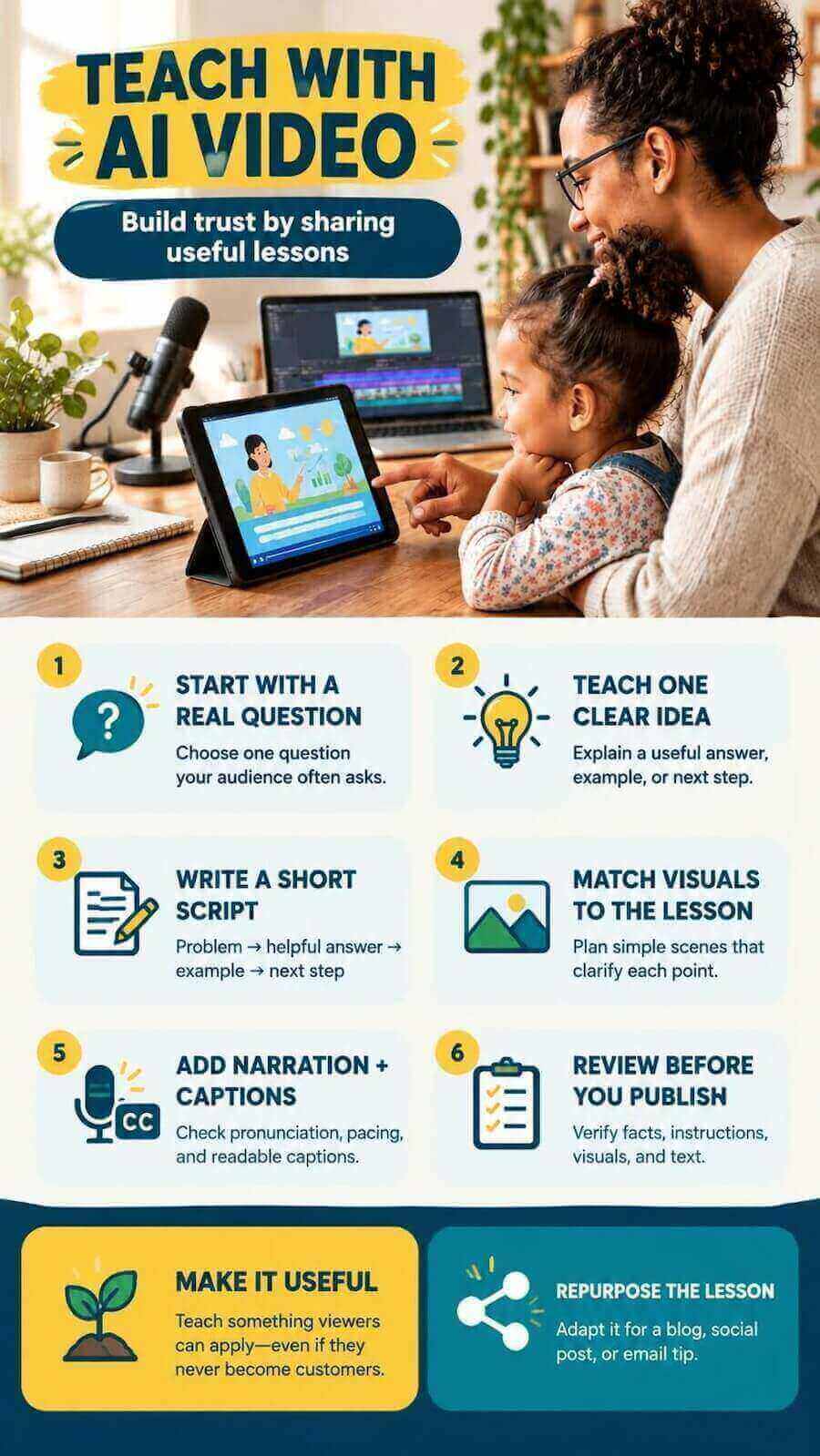
AI educational videos help small businesses teach useful ideas without filming with a camera. Start with a real question from your audience, build one short lesson around it, and use AI visuals, narration, and captions to make the answer easy to follow.
Keep the lesson accurate, specific, and useful. You can connect it to your services, but teach something viewers can apply before they become customers.
Plan each video as part of your video marketing strategy. For a camera-free production workflow, see how to create social media videos without filming. For format ideas and review tips, read AI explainer video formats and quality checks.
Choose One Useful Topic for AI Educational Videos
Start with a question your customers ask before they buy or use a service. Choose one answer that will help them take a clear next step. A short video works best when it teaches one idea, not a whole course.
For example, a local bakery could explain how to store a decorated cake before an event. A bookkeeper could show which receipts to gather before a tax appointment. Keep the advice accurate and within your expertise.
For effective AI educational videos, set one goal for each video. You might want viewers to understand a process, avoid a common mistake, or visit a helpful page. A clear goal makes it easier to choose what belongs in the script.
Write a Short, Clear Script
Use a simple structure: name the problem, explain one helpful answer, give a brief example, and end with one next step. Read the script aloud or use text-to-speech to check that it sounds natural. For more prompts, see these short-form video script ideas.
Keep sentences short. Avoid claims you cannot support, and check names, numbers, and instructions before making the video. A useful lesson should stand on its own, even if the viewer never clicks your call to action.
Plan AI Visuals Around the Lesson
Break the script into a few scenes. Use AI-generated images, animation, or graphics to clarify each point, not just to decorate the video. Keep people, products, and settings consistent from scene to scene, and review generated visuals for errors before publishing.
If you use an AI voice, listen for pronunciation and pacing. Add readable captions, then check them against the narration. YouTube explains how to add or edit captions. W3C also shares guidance on captions and subtitles.
Create AI Educational Videos Step by Step
Once you have a topic and script, plan how each part will appear. This AI video marketing process keeps the lesson focused and easier to review.
- Break the script into scenes. Give each scene one purpose, such as naming the problem, showing a step, or sharing an example.
- Write visual prompts. Describe the subject, setting, action, framing, and visual style. Keep key details consistent across scenes. Use AI-generated images, animation, or graphics to support the lesson.
- Build the sequence. Arrange the visuals in the same order as the narration. Keep transitions simple so they do not distract from the teaching point.
- Add narration and captions. Use a voice that is easy to understand. Review the narration for pacing and pronunciation, then check each caption against the audio. Read YouTube’s guidance on adding or editing captions and the W3C guidance on captions and subtitles.
- Check the final video. Watch or listen from beginning to end. Confirm that visuals match the words, text is readable, names and facts are correct, and the call to action is clear.
AI tools can make mistakes or create details that were not in your prompt. Review every scene before publishing, especially when the video explains a process, product, or safety-related topic.
Repurpose the Lesson
A short AI-generated video can support other useful content. Turn the main points into a blog post, a short social caption, or a simple email tip. Link each version to a relevant resource on your site, and make sure the written version still makes sense without the video.
Keep the core lesson consistent across formats. Adjust the length and wording for each channel, and include captions or a text summary so people can follow the key points in more than one way.
Teach With One Useful AI Video
Choose one audience question, teach one clear lesson, and support it with AI-generated visuals, narration, and captions. Review the finished video for accuracy and clarity before you publish it.
Start with a short script and one next step for viewers. Then use what you learn from audience feedback and available performance data to shape your next lesson. For a wider plan, read Video Marketing 101.
Frequently Asked Questions
Can AI educational videos teach my audience without filming?
Yes. You can combine AI-generated images or animation with narration, captions, and editing. Check that the visuals and claims are accurate before publishing.
What should I teach in a short video?
Answer one common question or explain one useful step. Keep the lesson focused so viewers can understand and use the information.
How do I plan visuals for an AI video lesson?
Break the script into scenes and match each scene to a point in the lesson. Use prompts that describe the subject, setting, action, and style, then review each generated visual for errors.
Should I add captions to an AI-generated video?
Captions can help viewers follow the narration, including people watching without sound. Check the captions against the audio and make sure the text is readable.
How can I tell whether the video helped my business?
Choose a measure that fits the goal, such as visits to a service page, inquiries, or completed views. Treat results as signals to review, not a guarantee that a video caused a sale.
Originally published January 2, 2022; Updated November 25, 2026, to update content for relevancy and accuracy.

As a Visual Digital Marketing Specialist for New Horizons 123, Julie works to grow small businesses, increasing their online visibility by leveraging the latest in internet and video technologies. She specializes in creative camera-less animated video production, custom images, content writing, and SlideShare presentations. Julie also manages content, blog management, email marketing, marketing automation, and social media for her clients.




Hi Julie,
Agree with you about teaching and video can be a great way to do this especially for people who coach. One thing I think people get caught up in is how much do they teach especially if they provide services. Perhaps that is why so much stuff you see is so general in nature on the internet.
Hi Susan,
Yes I can see where one might find it a challenge to determine at what point do they charge for sharing this knowledge. I also agree that much of what we do see for free is so general that we oftentimes don’t really learn anything new. I think it is important to be sure you are actually teaching your target something they don’t already know, and then charge for additional, more in-depth training.
Yes! I do have something that sets me apart from other parent coaches. I place a strong focus on building Emotional Intelligence Skills which research has proven is vital for longterm happiness and success for kids. Thanks for asking.
Your post is timely for me as I’m preparing parenting workshops. It would be great to tap in to markets outside of my local area. I’m having trouble finding a venue that will allow me to show a dvd from my computer though….
Agree with you Julie and vidoes are good for that. Seems lately I’m using videos to teach people about human rights, how to be a leader, run the world economy and so forth. Wonder what that makes me?:-)
@Keyuri: And that is a really great focus – one that I am sure you could – if you wanted to – extend into the adult population LOL. EI is not something enough people have! I am not the most technical tool in the shed but have you looked into a platform that allows you to share your desktop? I wonder if that would work where you play the DVD and share it from you desktop. You can also convert the DVD into video and use it that way. I use DVDVideoSoft Free Studio. It is really easy to use and works. If you would like to try it and or try playing a DVD and sharing it from your desktop, you are more than welcome to try out my MyVideoTalk Broadcaster to see if you like it. Give me a call – it would be nice to chat with you anyway 🙂
@Catarina: I see that you have been using videos and I really like them. The videos on your posts add so much to the message which is already very valuable. Not sure what that makes you LOL. Smart? 🙂
Hi Julie,
I’m seriously thinking of transitioning from the service business to creating training products. Video will definitely be one of the mediums that I need to offer as a delivery method. So, expect to hear from me in the future. 🙂
Hi Sherryl. That is a great idea. I have been working with Susan on putting together a product for myself except I have been stuck on step 1! argh. I look forward to hearing from you and in helping you in any way that I can. 🙂
Hi Solvita – glad you found the information valuable. Thanks for leaving your foot print 🙂
You are terrific at video, Julie. Like Sherryl, I too have thought about creating some training products. If they are really good (and this is key), they should start producing a passive income stream. What are your thoughts about having your own unique YouTube Channel?
Keep up the good work!
Thank you Julie ~ awesome information on the importance of video. You are brilliant in providing service for people who need help in this. Have a beautiful day! 🙂
Hi Catherine, Thanks for adding that educational videos as a follow-up to speaking engagements not only get the word out about your expertise, but will serve you well in getting more attendance at your next speaking event! 🙂
Hi Jeannette – I almost missed your comment – so nice to see you! “They” say we should all have products to sell. But you are right – they have to be good – there are many product floating around the web that are of zero value. Susan and I were discussing that. I think everyone who has a video HAS to have a Youtube Channel even if they (we) use other video platforms too. Not sure what you mean by “unique” channel. You can make your channel pretty and do whatever you want to make it as “unique” as possible, but it will always be Google’s Youtube brand you are on – there is no getting away from that. Hence the rise of platforms like MyVideoTalk where you can be your own brand. However, this does not mean that you should not have a Youtube channel too. I have both. Did I answer your question? 🙂
Hi Julie,
Educational videos are a creative way to follow up on a speaking engagement too. The fact is, no one has time to become an expert at everything and educational videos are a great way – as you say – to get the word out about your expertise.
I love, love teaching and besides sharing my knowledge on my site have certainly branched out to radio, teleseminars and videos. I also agree that many will only share minimal information for free…but I believe in the opposite..you can never give away too much…sharing your knowledge is important. If want you share is of value to others, then they will most certainly come back and pay for more:)
Very interesting Julie! I’ve seen presentations of Video Talk before and they are awesome!
Norma Doiron @The LEARNED Preneur ???
Hi Dr. Daisy, thanks so much for your comment. I think what the others and I were referring to is at what point do you make the cut-off to when you DO start charging? There are just some people who will take all the valuable knowledge you have to offer but as soon as you mention the $$ word – they are gone. I just had the opposite scenario happen twice in a row. I offered a free generic video to a bunch of home inspectors. Many took the generic one, one asked me to brand it to him and the other asked me to make him a totally different one customized to him. Both are paying for it. Nice surprise 🙂
@Susan: I agree with what you say and if what you offer is really valuable – then the chances are that they will come back for more.
@ Norma: I agree – that is why I use them! You know where you to go if you want to hear more 🙂
Hi Julie,
Great concept here. I think Aristotle Onassis said it really well: The secret of business is to know something that nobody else knows.
I think that in “how” we share this info, we position ourselves to not only stand out against the pack, but also to attract more of what we are designing for ourselves.
Love the ideas you share!!
Thanks,
Cat Alexandra
Agreed Cat – it is all about who we know that knows someone else – everywhere in life. Get in front of the influencers in your niche, get them behind you, and you are on your road to success! That is the whole concept behind celebrity product endorsements, right?