
Canva vs. CapCut is a common choice for small businesses creating social media videos, but each tool serves different needs. Canva focuses more on templates, graphics, brand assets, and simple video projects. CapCut focuses more on short-form editing, effects, captions, and video timing.
This comparison looks at their published features, pricing options, and best uses for small businesses. Features and prices can change, so check the official product pages before subscribing.
Note: This is a feature-based comparison, not a hands-on review. Recommendations are based on published product information and common business use cases.
The Quick Verdict
Here is the short version before we get fancy with details.
| Tool | Best fit | What to check before choosing |
|---|---|---|
| Canva | Branded graphics, templates, presentations, and simple business videos | Video editing depth, current plan limits, and available AI features |
| CapCut | Short-form video editing, effects, captions, and fast social content | Current export rules, AI credit limits, pricing, and available features by region |
Canva is the stronger fit when your content starts with brand colors, graphics, templates, or product images. CapCut may be the better fit when your content starts with video clips, a script, captions, and fast-paced edits.
Watch the video below for a quick overview, then use the comparison below to decide which tool fits your workflow.
Both platforms offer free access, plus paid plans with more features. Canva lists Free, Pro, Business, and Enterprise options. CapCut offers monthly and annual Pro plans. Pricing, plan limits, AI credits, and available features may change, so check the official pages before you buy.
Canva vs. CapCut Feature Comparison
| Feature | Canva | CapCut |
|---|---|---|
| Main focus | Branded graphics, templates, and simple videos | Short-form video editing |
| Best starting point | Brand colors, images, templates, and layouts | Video clips, scripts, captions, and music |
| Video editing | Good for simple projects | More focused on editing clips and timing |
| Templates | Strong fit for branded designs and social posts | Strong fit for short-form video templates |
| Captions and effects | Available features vary by plan | Available features vary by plan and region |
| Best for | Small business graphics and promotional content | Reels, Shorts, and fast social clips |
| Pricing | Free and paid plans | Free and paid plans |
Feature access, export limits, AI credits, and pricing can change. Check the official product pages before subscribing. This Canva vs. CapCut comparison comes down to how you create content. Canva may fit a design-first workflow, while CapCut may fit a video-first workflow.
Why Canva May Fit Some Brands
Canva may be a good fit for businesses that rely on templates, brand colors, social posts, presentations, and quick promotional graphics.

Canva’s official video information highlights templates, animation, transitions, captions, and AI-assisted video creation. These features may appeal to businesses that want to create branded content without using a separate design platform. Check the current plan details before assuming a specific feature is included.
It also plays nicely with camera-free workflows. If you’re repurposing articles, product shots, screenshots, or AI images, Canva’s published video features are designed to help users combine images, templates, motion, music, and voiceover elements in one project. If you are repurposing blog posts, this guide explains how to turn blog posts into short videos
The catch is simple. Canva is good at video, but video is not its whole personality. If your project requires detailed timeline editing or more advanced caption control, compare Canva’s current video features with a dedicated video editor before choosing. Canva shines when consistency matters more than editing depth.
Why CapCut May Fit Fast Social Clips
CapCut is worth considering when the main job is editing short social videos. It is commonly associated with fast cuts, effects, captions, motion, and other features used in short-form content.

CapCut may fit a video-first workflow that uses clips, AI visuals, voiceovers, music, captions, and motion effects. Before recommending a specific feature, check CapCut’s current documentation because tools, limits, and AI credits can vary by plan and region. Its video-editing focus may make it a better fit for projects that depend on precise timing between text, music, and visuals.
For small businesses that publish short videos often, editing speed and repeatable workflows may matter more than having a large template library. You can use a video-first workflow to arrange clips, adjust timing, add motion, and prepare content for Reels, YouTube Shorts, and ads.
For stronger opening lines, see this guide to short video hooks. The drawback is branding. Canva keeps fonts, colors, and layouts in a cleaner system. Canva may be a more natural fit for teams that begin with reusable brand colors, fonts, and layouts. Check CapCut’s current brand and template features if brand consistency is a priority.
Which Tool Fits Your Content Workflow?
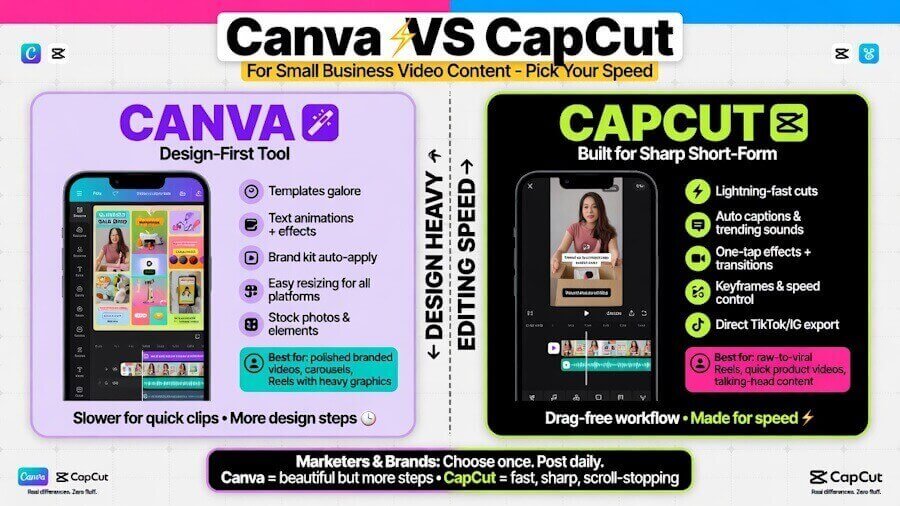
Choose Canva if your project begins with:
- Brand colors and fonts
- Social media templates
- Product images
- Presentations or graphics
- Simple promotional videos
Consider CapCut if your project begins with:
- Video clips
- A script or voiceover
- Captions
- Fast cuts and transitions
- Short-form content for social media
If you are unsure about the Canva vs. CapCut choice, compare the specific task rather than choosing based on popularity. A small business creating branded graphics may need a different tool than a business producing several short videos each week.
If your main goal is creating AI-generated clips rather than manually editing video, see these best AI video generators for small business marketing.
Is Canva or CapCut better for AI-generated video content?
Canva may fit projects that start with images, brand graphics, templates, and simple promotional videos. CapCut may fit projects that start with clips, captions, effects, music, and faster short-form editing. Compare the current AI features and usage limits before choosing.
Can I use CapCut without filming myself?
Yes. You can build videos in CapCut with AI images, stock clips, text, voiceovers, music, and motion elements. You do not need camera footage to make it useful.
Which tool is easier for beginners?
Canva may feel more approachable for beginners who want to start with templates and branded layouts. CapCut may suit beginners whose main goal is editing clips, adding captions, and creating short-form videos. The better choice depends on how your project begins.
Do small businesses need both Canva and CapCut?
Not always. If you publish occasionally, pick one. If you create content every week, using Canva for brand assets and CapCut for final editing is a practical combo.
Which is better for small business video content?
Neither tool is best for every business. Canva may be a better fit for branded graphics, templates, and simple promotional videos. CapCut may be a better fit for short-form editing, captions, effects, and faster video production. Compare the specific features and plan limits you need before choosing.
Is Canva or CapCut cheaper?
Both platforms offer free access, but paid prices and included features can change. Canva and CapCut also organize their plans differently. Check the current official pricing pages before comparing costs. A cheaper plan may not include the feature your business needs.
Final Thoughts About Canva Vs. CapCut
The best Canva vs. CapCut choice depends on the type of content you create. Canva may be a better fit when your project starts with brand colors, templates, graphics, product images, or simple promotional videos.
CapCut may be a better fit when your project starts with video clips, captions, music, effects, and short-form editing. If you create several types of content, you may use Canva for visual assets and CapCut for video editing.
Before choosing, compare the current features, export limits, AI credits, and pricing for the plan you need. Features can change, so check the official product pages before subscribing.
Originally published April 27, 2026; Republished September 7, 2026, to update content.

As a Visual Digital Marketing Specialist for New Horizons 123, Julie works to grow small businesses, increasing their online visibility by leveraging the latest in internet and video technologies. She specializes in creative camera-less animated video production, custom images, content writing, and SlideShare presentations. Julie also manages content, blog management, email marketing, marketing automation, and social media for her clients.



0 Comments