
Visual storytelling is the use of images, video, graphics, or animation to tell a story. The visuals show a subject, a situation, and a change or outcome. Text and sound can support the story, but the visuals carry part of its meaning.
For a small business, that might mean showing how a product solves a problem, how a service changes a customer’s situation, or how something gets made.
The key is not simply adding attractive pictures. Each visual should help the viewer understand what is happening and why it matters. Below, you’ll find the main elements of visual storytelling, three practical examples, and a step-by-step process for planning your own story.
What Is Visual Storytelling?
Visual storytelling communicates meaning through what the audience sees. A single photograph can suggest a story through a person’s expression, surroundings, and actions. A series of images or a video can show that story unfolding over time.
The difference between visual content and visual storytelling is the narrative. A product photo shows an item. A visual story shows who uses it, what problem they face, and what happens next.
Key Elements and Features of Visual Storytelling
A useful visual story usually includes these elements:
- A subject: Give the audience someone or something to follow. This could be a customer, employee, product, or community.
- A clear situation: Show where the story begins. What does the subject need, want, or struggle with?
- A change: Show an action, discovery, challenge, or solution that moves the story forward.
- An outcome: Make the result visible. What is different at the end?
- Visual cues: Use expressions, setting, framing, color, and contrast to help viewers understand the story.
- A takeaway: Decide what the audience should understand, remember, or do next.
Not every story needs a dramatic conflict. Showing how a baker turns ingredients into a finished cake can tell a useful story through a simple process.
A quick test: If you removed the headline, would the visuals still communicate something meaningful? If not, you may have decoration rather than a visual story.
Visual Storytelling vs. Text-Based Storytelling
Visuals and text serve different purposes. Use the format that makes the message easiest to understand.
| Format | What it can show or explain | Example |
|---|---|---|
| Visual storytelling | Actions, settings, expressions, processes, and visible change | Photos showing a room before, during, and after cleaning |
| Text-based storytelling | Context, detailed explanations, thoughts, and precise information | A written account explaining why the customer needed help |
| Combined storytelling | A visible story supported by necessary details | A customer video with captions explaining the problem and solution |
Visual Storytelling Examples for Small Businesses
The following examples are sample concepts, not client case studies. Each shows how a business can turn a message into a visible story.
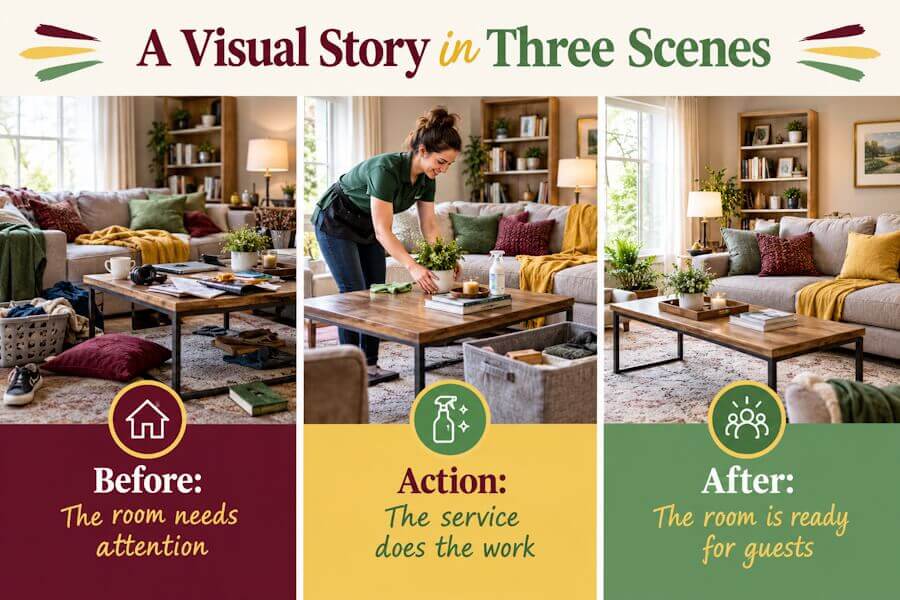
Example 1: A Cleaning Service Shows a Transformation
Message: A cleaning service can help a homeowner prepare a room for guests.
- Beginning: Show the room before cleaning, with cluttered surfaces and items out of place.
- Action: Show the cleaner organizing the space and cleaning key areas.
- Outcome: Show the same room ready for visitors.
- Visual cue: Use the same camera angle in the opening and closing shots so viewers can compare the space.
- Next step: Invite viewers to request a cleaning quote.
If your storyboard will become a video, our guide to writing better AI video prompts shows how to specify the goal, subject, setting, style, motion, and pacing.
The story is not just “we clean homes.” It shows a specific situation and a visible change.
Example 2: A Bakery Shows the Work Behind a Custom Cake
Message: A custom cake starts with a customer’s idea and takes shape through skilled work.
- Beginning: Show a design sketch beside the ingredients.
- Action: Show the baker mixing, assembling, and decorating the cake.
- Outcome: Show the finished cake beside the original sketch.
- Visual cue: Repeat a color or detail from the sketch in the final cake.
- Next step: Invite viewers to ask about a custom order.
This story explains the process behind the product. It gives the viewer more context than a finished-cake photo alone.
Example 3: A Software Business Explains a Task With Animation
Message: The software brings appointment details into one place.
- Beginning: Show a business owner switching between a calendar, messages, and handwritten notes.
- Action: Show those appointment details moving into one scheduling screen.
- Outcome: Show the owner reviewing the day’s bookings in that screen.
- Visual cue: Keep the same owner and appointment details throughout the animation.
- Next step: Invite viewers to watch a demonstration.
Only show features the software actually provides. If you use a mockup, label it clearly.
A strong business story often uses both. Let the visuals show the action, then use short text to explain details the audience cannot see.
How Visual Storytelling Can Support Engagement
Visual storytelling helps people understand a message when visuals make an action, process, or change easier to follow. For example, a demonstration can show how a product works. A sequence of photos can explain a service. A customer story can give viewers a specific situation they recognize.
However, adding images or video does not guarantee better results. The story must fit the audience, make a clear point, and support the page’s purpose.
Measure the Result That Matches Your Goal
Choose one main goal before you publish. Then track a result that relates to that goal.
| Goal | What to measure | What to review |
|---|---|---|
| Explain a process | Video completion, relevant questions, or feedback | Where do viewers become confused? |
| Encourage useful sharing | Shares and saves | What information do people want to revisit or pass along? |
| Bring people to a page | Link clicks and referral visits | Does the story give viewers a reason to click? |
| Generate inquiries | Contact submissions or quote requests | Is the next step clear and relevant? |
| Support a purchase | Purchases or another defined conversion | Does the story answer a buying question? |
Treat time on page as a clue, not proof of success. A longer visit might reflect interest, but it can also reflect confusion. Look at it alongside actions and feedback. For a broader plan covering goals, publishing, and measurement, see our guide to building a video content marketing strategy.
Visual Storytelling Techniques That Make the Message Clear
The best design choice helps the audience follow the story. Start with clarity, then add style.
Guide Attention With Framing and Layout
- Choose one main subject per scene. Remove details that compete with the main action.
- Make important details easy to see. Use size, spacing, and contrast to separate the subject from the background.
- Keep the sequence clear. Use numbered panels, consistent placement, or a visible reading order.
- Use a consistent viewpoint when comparing change. Matching before-and-after angles make the comparison easier to judge.
- Use color with purpose. Keep your brand colors consistent, but do not rely on color alone to explain meaning.
Color associations vary with context and audience. Choose colors for readability and brand fit rather than assuming that one color will create the same emotion for everyone.
Use Movement to Show Something Happening
Animation is useful when movement explains a process, directs attention, or shows change. For example, animate an item moving through an ordering process or show how separate tasks connect. Avoid moving objects simply to fill the screen.
If you plan to use animation, our guide to animated explainer videos for small businesses walks through goals, scripts, storyboards, and production planning.
Make the Story Accessible
- Write useful alt text for informative images.
- Use empty alt text for images that are purely decorative.
- Add captions to videos with spoken content.
- Explain important visual information in nearby text or an audio description.
- Keep on-screen text large enough to read on a phone.
- Do not use color as the only way to distinguish steps or results.
- Provide a text explanation for complex charts or diagrams.
The W3C image accessibility guidance explains how to handle informative, decorative, functional, and complex images.
How to Create a Visual Story: A Step-by-Step Process
You do not need a large production budget to start. You need a clear message and a plan for what the audience will see. If AI will help create your stills, see our guide to AI image prompts for brand-ready social graphics for guidance on subject, composition, style, format, and what to avoid.
Step 1: Choose One Audience and One Goal
Decide who the story is for, what you want it to achieve, and which result will tell you whether it worked.
For example:
- Audience: Homeowners preparing for overnight guests.
- Goal: Encourage requests for a cleaning quote.
Avoid trying to explain every service or reach every customer in one story.
Step 2: Write the Main Message in One Sentence
Complete this sentence:
After seeing this story, the viewer should understand that __________.
For the cleaning example:
After seeing this story, the viewer should understand that the service can help prepare a room for guests.
Use that sentence to decide what belongs in the story.
Step 3: Plan the Beginning, Action, and Outcome
Write three short notes:
- Beginning: What situation does the viewer need to understand?
- Action: What happens to change that situation?
- Outcome: What is different at the end?
Make the outcome visible where possible. If the result cannot be shown directly, explain it with a clear caption and supporting evidence.
Step 4: Build a Simple Storyboard
A storyboard is a plan for what each scene or panel will show. Start with three to six panels and add more only when the story needs them.
Use this planning table:
| Scene | What the viewer sees | Supporting text | Purpose |
|---|---|---|---|
| Beginning | The starting situation | Name the problem or need | Give the viewer context |
| Action | The process, decision, or solution | Explain only what is not visible | Show what changes |
| Outcome | The result | State the takeaway or next step | Complete the story |
Sketches, written scene notes, or simple slides are enough for a first draft. You do not need polished artwork to test the sequence.
Step 5: Choose the Format and Create the Visuals
Match the format to what the audience needs to understand:
- Photo sequence: Useful for a visible transformation or process.
- Carousel: Useful for a story people can follow panel by panel.
- Short video: Useful for action, demonstrations, and behind-the-scenes stories.
- Animation: Useful for explaining an idea or process that is difficult to film.
- Annotated graphic: Useful for explaining relationships, comparisons, or change.
For a broader plan covering audience, formats, and publishing, see our visual content strategy guide.
Step 6: Review, Publish, and Improve
Before publishing, check that:
- The story has one clear point.
- Each scene helps explain that point.
- The visuals are accurate.
- Any results or claims have evidence.
- You have permission to use the images, music, and people shown.
- Text and captions are readable.
- The next step matches the goal.
Then publish and review the result you chose in Step 1. Use what you learn to improve the next version.
Using AI to Help With Visual Storytelling
AI can help you turn a rough idea into a visual story, but it still needs your direction. Start with the message you want to share, who you’re trying to reach, and what you want viewers to do next. Then use AI to support the creative process—not make every decision for you.
Turn Your Idea Into a Storyboard
Before creating images or video clips, map out the story. Ask AI to suggest a beginning, middle, and end, along with visuals that support each part.
For example, a bakery promoting a weekend special could build a three-scene story:
- Beginning: Show the ingredients being prepared.
- Middle: Show the baker decorating the finished treat.
- End: Show the product with a clear invitation to visit.
AI can help draft the scene descriptions, captions, and voiceover. Real photos or footage should show the actual product so customers know what to expect.
Try a prompt like this:
“Plan a three-scene, 20-second video promoting our bakery’s weekend strawberry cupcakes. The audience is local customers, and the tone should be warm and inviting. Suggest a visual and a short caption for each scene. Don’t invent prices, ingredients, or availability.”
Create Visuals That Feel Connected
AI image tools can help you explore styles, backgrounds, and illustration concepts. Keep your colors, lighting, and overall look consistent so the visuals feel like parts of the same story.
Describe what you need rather than asking for “an engaging image.” Include the subject, setting, composition, and mood. Leave headlines and other text for your design editor, where you can control spelling and readability.
Keep Human Review in the Process
AI-generated content can contain inaccurate details, awkward movement, or inconsistent characters. Review every asset before publishing.
Check that:
- Each visual supports your message.
- Products, people, and business details are represented accurately.
- You have the necessary rights and permissions.
- Captions are readable, and the story makes sense without sound.
- Generated scenes don’t imply real customer experiences or results.
The goal isn’t to use AI everywhere. Use it where it helps you plan, experiment, or adapt content, while keeping your judgment and brand knowledge at the center of the story.
Final Thoughts: Make Your Story Worth Remembering
Effective visual storytelling isn’t about having the biggest budget or the most polished graphics. It’s about helping people understand what you do, why it matters, and how it connects to their lives. A behind-the-scenes photo, a customer’s experience, or a short video can tell a compelling story when it has a clear purpose.
AI can make planning and creating visuals easier, but your perspective is what makes them meaningful. Use it to explore ideas and save time—not to replace the real people, products, and experiences that make your business distinctive.
Start with one story your audience would care about. Choose the visuals that tell it best, share it, and learn from the response. You don’t need to tell every part of your business’s story at once. You just need to give people a reason to keep listening.
Originally published May 30, 2025; Republished on October 9, 2026, to update content.

Enhance and Refine Your AI Image Prompts

As a Visual Digital Marketing Specialist for New Horizons 123, Julie works to grow small businesses, increasing their online visibility by leveraging the latest in internet and video technologies. She specializes in creative camera-less animated video production, custom images, content writing, and SlideShare presentations. Julie also manages content, blog management, email marketing, marketing automation, and social media for her clients.




Visuals are very helpful for sure. When sharing any kind of content, an image or video can help the person understand more of the written content. Thanks for sharing.
Hi Barry,
Yes, visuals do help. I try to do a blog post summary video as often as possible to attract more eyeballs.